Salta al contenuto principale
Unisciti alla Community delle riparazioni - Crea un account

Sharp Aquos Crystal Screen Replacement

Cosa ti serve

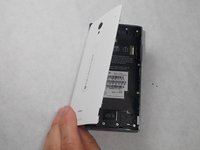
  1. Sharp Aquos Crystal Screen Replacement, Back Panel: passo 1, immagine 1 di 3 Sharp Aquos Crystal Screen Replacement, Back Panel: passo 1, immagine 2 di 3 Sharp Aquos Crystal Screen Replacement, Back Panel: passo 1, immagine 3 di 3
    • Peel back the back cover of the phone from the access point to remove it. It should come off easily using your hands.

    Chiedi a FixBot
  2. Sharp Aquos Crystal Screen Replacement, USB Port: passo 2, immagine 1 di 2 Sharp Aquos Crystal Screen Replacement, USB Port: passo 2, immagine 2 di 2
    • Remove seven 3mm Star #5 screws shown in the picture with a screwdriver.

    • Remove two 3.5mm Star #5 screws shown in the picture with a screwdriver.

    • Remove two 5mm Star #5 screws shown in the picture with a screwdriver.

    Chiedi a FixBot
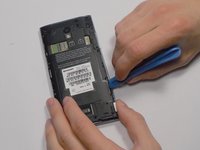
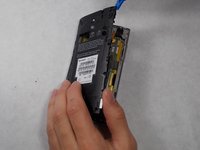
  3. Sharp Aquos Crystal Screen Replacement: passo 3, immagine 1 di 2 Sharp Aquos Crystal Screen Replacement: passo 3, immagine 2 di 2
    • Pry open the back panel using a plastic opening tool. Do this around the edges until you are able to lift it off.

    Chiedi a FixBot
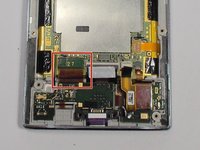
  4. Sharp Aquos Crystal Screen Replacement: passo 4, immagine 1 di 2 Sharp Aquos Crystal Screen Replacement: passo 4, immagine 2 di 2
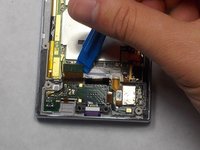
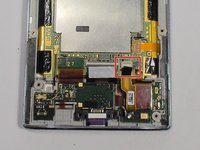
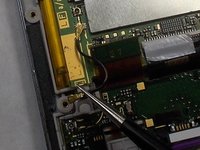
    • Disconnect the wire by lifting it up with a plastic opening tool.

    Chiedi a FixBot
  5. Sharp Aquos Crystal Screen Replacement: passo 5, immagine 1 di 3 Sharp Aquos Crystal Screen Replacement: passo 5, immagine 2 di 3 Sharp Aquos Crystal Screen Replacement: passo 5, immagine 3 di 3
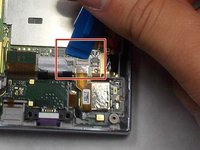
    • To disconnect the cable, use the tip of a spudger or your fingernail to flip up the small retaining flap. Then, you can safely pull the ribbon cable out.

    Chiedi a FixBot
  6. Sharp Aquos Crystal Screen Replacement: passo 6, immagine 1 di 1
    • After removing the wires, carefully snap out the usb port with your hands. It is held down by some plastic clips, so some force may be needed.

    Chiedi a FixBot
  7. Sharp Aquos Crystal Screen Replacement, Motherboard: passo 7, immagine 1 di 1
    • Peel off the black pieces of tape.

    Chiedi a FixBot
  8. Sharp Aquos Crystal Screen Replacement: passo 8, immagine 1 di 1
    Strumento utilizzato in questo passaggio:
    Tweezers
    $4.99
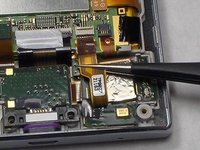
    • Use the tip of a spudger or your fingernail to flip up the small retaining flap. Then pull the cable out using tweezers.

    Chiedi a FixBot
  9. Sharp Aquos Crystal Screen Replacement: passo 9, immagine 1 di 2 Sharp Aquos Crystal Screen Replacement: passo 9, immagine 2 di 2
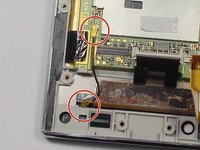
    • Remove the wire from the two marked connections using tweezers to pull the wire apart from the device.

    Chiedi a FixBot
  10. Sharp Aquos Crystal Screen Replacement: passo 10, immagine 1 di 1
    • Peel the tape off with your hands.

    Chiedi a FixBot
  11. Sharp Aquos Crystal Screen Replacement: passo 11, immagine 1 di 1
    • Lift the motherboard out with your hands.

    Chiedi a FixBot
  12. Sharp Aquos Crystal Screen Replacement, Battery: passo 12, immagine 1 di 1
    • Peel off the tape holding the battery down.

    Chiedi a FixBot
  13. Sharp Aquos Crystal Screen Replacement: passo 13, immagine 1 di 2 Sharp Aquos Crystal Screen Replacement: passo 13, immagine 2 di 2
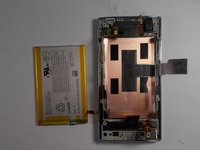
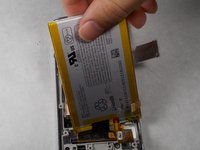
    • Lift the battery out with your hands.

    Chiedi a FixBot
  14. Sharp Aquos Crystal Screen Replacement, Screen: passo 14, immagine 1 di 1
    • Replace this component with the new one.

    Chiedi a FixBot
Conclusione

To reassemble your device, follow these instructions in reverse order.

Altre 4 persone hanno completato questa guida.

Team

1Commento della guida

Thanks! I did it!

Matteo Favero - Rispondi Condividi
Aggiungi Commento

Visualizza statistiche:

Ultime 24 ore: 4

Ultimi 7 giorni: 8

Ultimi 30 giorni: 47

Tutti i Tempi: 11,126