Questa traduzione è stata generata automaticamente e non è stata ancora revisionata da una persona. Parli questa lingua? Dai un’occhiata.
Introduzione
Se il telefono non si accende o la batteria non si carica, potrebbe essere necessaria una batteria sostitutiva.
Questa guida ti mostrerà come aprire il dispositivo e rimuovere la scheda madre interna per sostituire la batteria.
Cosa ti serve
-
-
-
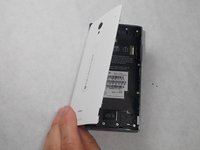
Solleva la cover posteriore del telefono dal punto di accesso per rimuoverla. Dovrebbe venire via facilmente usando le mani.
 Chiedi a FixBot
-
-
-
-
-
Rimuovi le sette viti Star #5 da 3 mm mostrate nell'immagine con un cacciavite.
-
Rimuovi le due viti Star #5 da 3,5 mm mostrate nell'immagine con un cacciavite.
-
Rimuovi le due viti Star #5 da 5 mm mostrate nell'immagine con un cacciavite.
-
-
-
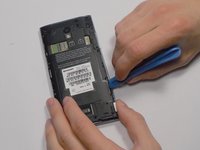
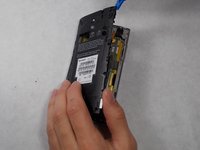
Fai leva per aprire il pannello posteriore usando uno strumento di apertura in plastica. Procedi lungo i bordi finché non riesci a sollevarlo.
-
-
-
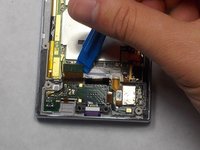
Scollega il cablaggio sollevandolo con uno strumento di apertura in plastica.
-
-
-
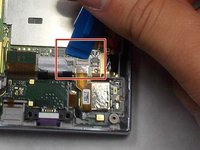
Per scollegare il cavo, usa la punta di uno spudger o l'unghia per sollevare la piccola aletta di bloccaggio. Successivamente, puoi estrarre in sicurezza il cavo a nastro.
-
-
-
-
Dopo aver rimosso il cablaggio, sgancia con attenzione la porta USB usando le mani. È fissata da alcune clip in plastica, quindi potrebbe essere necessaria un po' di forza.
-
-
-
-
Strumento utilizzato in questo passaggio:Tweezers$4.99
-
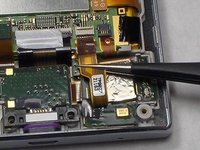
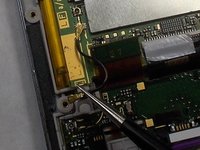
Usa la punta di uno spudger o l'unghia per sollevare la piccola aletta di bloccaggio. Poi estrai il cavo usando delle pinzette.
-
-
-
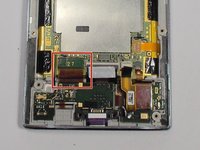
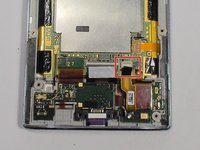
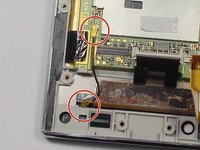
Rimuovi il cablaggio dalle due connessioni contrassegnate usando le pinzette per staccarlo dal dispositivo.
-
-












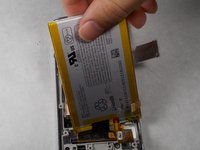
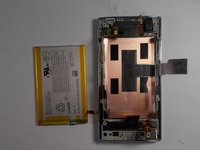
Per rimontare il dispositivo, segui queste istruzioni in ordine inverso.
Annulla: non ho completato questa guida.
Altre 9 persone hanno completato questa guida.

Team

UMass Dartmouth, Team 7-4, Catania Spring 2016 Membro di UMass Dartmouth, Team 7-4, Catania Spring 2016
UMASSD-CATANIA-S16S7G4
3 Membri
72 guide realizzate
3Commenti sulla guida
very helpful. I already replace my sharp 305sh battery
and then I find my power button is out of order.
so i just can keep it still on. use shake to lock screen and touch to unlock.
restart by unplug sim card.
but these day I made it out of power.so it turn off. however I use anyway to make it alive but I can’t.
luck me. I HARDLY PRESS camera left side near down the power button side and press on button .
It turns on.
the power board need to touch on some device on anther side.
!Mucho Gracias!
hello, where can I buy this battery ? thanks, Ari
battery connector located on motherbaoard has been broken when i was changing my aquos R2 battery.....kind guide me what to do now.....should we use jumper wires direct to the battery ??? if yes then guide me
