Questa traduzione è stata generata automaticamente e non è stata ancora revisionata da una persona. Parli questa lingua? Dai un’occhiata.
Introduzione
Se la tua Samsung TL220 emette un rumore metallico dall'interno, usa questa guida per sostituire la molla e mantenere la batteria della fotocamera in posizione.
La molla all'interno della fotocamera ha il compito di mantenere la batteria in sede. Se la molla si allenta o non sostiene più la batteria, può causare danni all'interno della fotocamera.
Assicurati che la fotocamera sia completamente spenta prima di iniziare.
Cosa ti serve
-
-
-
Inizia svitando tutte e sette le viti a croce Phillips da 4 mm situate all'esterno della fotocamera.
-
Utilizzando lo strumento di apertura in plastica, fai leva con attenzione per aprire la fotocamera, sollevando e rimuovendo il guscio posteriore.
 Chiedi a FixBot
-
-
-
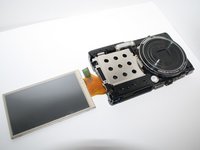
Ora che hai rimosso la cover posteriore, sposta delicatamente lo schermo LCD dalla fotocamera verso destra e appoggialo a faccia in giù sul tavolo.
-
Successivamente svita le tre viti a croce Phillips da 4 mm sul pannello posteriore con lo stesso cacciavite.
-
-
-
Strumento utilizzato in questo passaggio:Tweezers$4.99
-
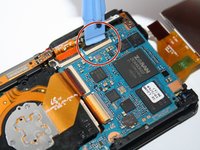
Sgancia i quattro connettori che fissano le strisce di pellicola arancioni con lo strumento di apertura.
-
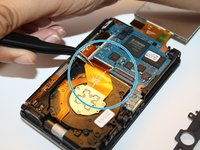
Rimuovi delicatamente le quattro strisce di pellicola arancioni dai connettori usando le pinzette.
-
-
-
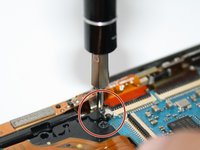
Una volta rilasciate le pellicole protettive arancioni dai connettori, svita la vite a croce Phillips argentata da 4 mm che fissa la parte superiore del telaio della fotocamera.
-
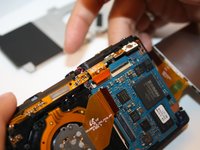
Con le dita, spingi delicatamente verso l'alto il telaio superiore della fotocamera. Una volta rimosso il telaio superiore della fotocamera, puoi rimuovere delicatamente anche l'involucro anteriore della fotocamera.
-
-
-
Capovolgi l'intera fotocamera in modo che gli obiettivi siano rivolti verso l'alto e lo schermo LCD sia visibile di lato.
-
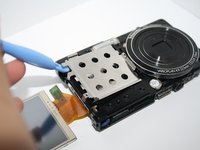
Ora rimuovi il guscio argentato, come mostrato nell'immagine.
-
-
-
Dopo aver smontato tutti i componenti, raggiungerai la molla della fotocamera.
-
-







Per rimontare il dispositivo, segui queste istruzioni in ordine inverso.
Annulla: non ho completato questa guida.
Altre 2 persone hanno completato questa guida.


