Salta al contenuto principale
Unisciti alla Community delle riparazioni - Crea un account

Samsung T139 SIM Card Replacement

Cosa ti serve

  1. Samsung T139 SIM Card Replacement, Remove Back Cover: passo 1, immagine 1 di 3 Samsung T139 SIM Card Replacement, Remove Back Cover: passo 1, immagine 2 di 3 Samsung T139 SIM Card Replacement, Remove Back Cover: passo 1, immagine 3 di 3
    • Power off your phone before beginning disassembly

    • Apply pressure to the back cover and slide towards the base

    Chiedi a FixBot
  2. Samsung T139 SIM Card Replacement, Remove Battery: passo 2, immagine 1 di 2 Samsung T139 SIM Card Replacement, Remove Battery: passo 2, immagine 2 di 2
    • With a plastic opening tool, lift and remove the battery

    Chiedi a FixBot
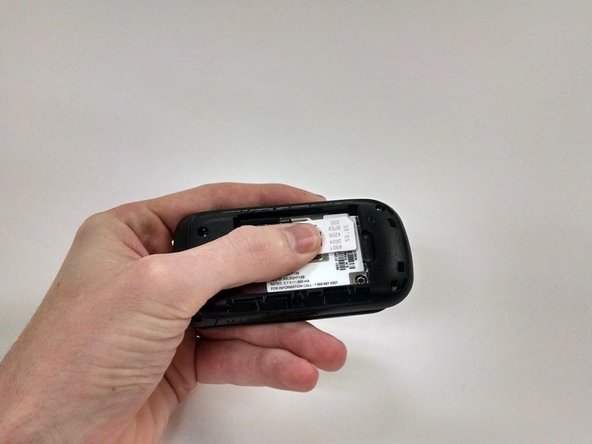
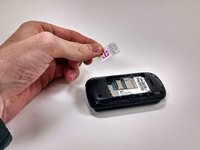
  3. Samsung T139 SIM Card Replacement, SIM Card: passo 3, immagine 1 di 3 Samsung T139 SIM Card Replacement, SIM Card: passo 3, immagine 2 di 3 Samsung T139 SIM Card Replacement, SIM Card: passo 3, immagine 3 di 3
    • Using your thumb, slide SIM card out toward the base of the phone

    • The SIM card is a thin plastic component and can easily break under excessive force. Press and slide as gently as possible

    Chiedi a FixBot
Conclusione

To reassemble your device, follow these instructions in reverse order.

Un'altra persona ha completato questa guida.

Reagan May

Membro da: 10/23/14

588 Reputazione

5 guide realizzate

Team

Michigan Tech, Team 1-1, Lauer Fall 2014 Membro di Michigan Tech, Team 1-1, Lauer Fall 2014

MTU-LAUER-F14S1G1

3 Membri

9 guide realizzate

0Commenti sulla guida

Aggiungi Commento

Visualizza statistiche:

Ultime 24 ore: 0

Ultimi 7 giorni: 3

Ultimi 30 giorni: 37

Tutti i Tempi: 1,694