Salta al contenuto principale
Unisciti alla Community delle riparazioni - Crea un account

Samsung ST76 Screen Replacement

Cosa ti serve

  1. Samsung ST76 Screen Replacement, Back Panel: passo 1, immagine 1 di 3 Samsung ST76 Screen Replacement, Back Panel: passo 1, immagine 2 di 3 Samsung ST76 Screen Replacement, Back Panel: passo 1, immagine 3 di 3
    • Use a Phillips head screwdriver to remove 5 screws from the camera. There are 2 4mm screws on the left side, 2 2mm screws on the right side and 1 4mm screw on the bottom.

    • Do not mix the 5 screws; they are different sizes.

    Chiedi a FixBot

    Aggiungi Commento

  2. Samsung ST76 Screen Replacement: passo 2, immagine 1 di 2 Samsung ST76 Screen Replacement: passo 2, immagine 2 di 2
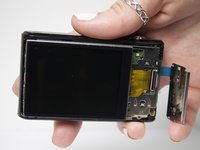
    • Use your fingers to pull the back cover off.

    Chiedi a FixBot

    Aggiungi Commento

  3. Samsung ST76 Screen Replacement, Screen: passo 3, immagine 1 di 2 Samsung ST76 Screen Replacement, Screen: passo 3, immagine 2 di 2
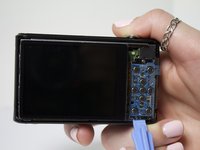
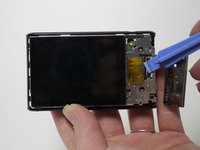
    • Separate the button panel to reveal the port holding the screen on.

    • Use a plastic opening tool to help with this task.

    Chiedi a FixBot

    Aggiungi Commento

  4. Samsung ST76 Screen Replacement: passo 4, immagine 1 di 2 Samsung ST76 Screen Replacement: passo 4, immagine 2 di 2
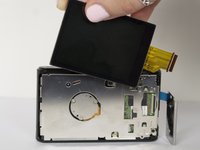
    • Remove the yellow cable by pulling gently upwards, away from the inside of the camera, until it separates from its port.

    Chiedi a FixBot

    Aggiungi Commento

Conclusione

To reassemble your device, follow these instructions in reverse order.

Annulla: non ho completato questa guida.

Altre 3 persone hanno completato questa guida.

Team

Marist, Team 1-6, Laflen Spring 2015 Membro di Marist, Team 1-6, Laflen Spring 2015

MARS-LAFLEN-S15S1G6

2 Membri

8 guide realizzate

1Commento della guida

Where did you buy a replacement screen?

Demaree Wiitala - Rispondi Condividi

Aggiungi Commento

Visualizza statistiche:

Ultime 24 ore: 4

Ultimi 7 giorni: 12

Ultimi 30 giorni: 43

Tutti i Tempi: 1,132