Salta al contenuto principale
Unisciti alla Community delle riparazioni - Crea un account

Samsung Level Box Mini Buttons Replacement

Cosa ti serve

  1. Samsung Level Box Mini Buttons Replacement, Buttons: passo 1, immagine 1 di 2 Samsung Level Box Mini Buttons Replacement, Buttons: passo 1, immagine 2 di 2
    Strumento utilizzato in questo passaggio:
    Tweezers
    $4.99
    • Using a plastic opening tool, go around the edges of the rubber bottom. Insert the same tool under the edge of the rubber and swivel side to side. Continue moving it forward while peeling the plastic off with the precision tweezers.

    Chiedi a FixBot

    Aggiungi Commento

  2. Samsung Level Box Mini Buttons Replacement: passo 2, immagine 1 di 1
    • Remove the six 4.5 mm Philips #1 screws from the bottom plate using the Screwdriver J00 Philips Head. Take off the bottom plate.

    Chiedi a FixBot

    Aggiungi Commento

  3. Samsung Level Box Mini Buttons Replacement: passo 3, immagine 1 di 1
    • Using the plastic opening tool, remove the batteries from the device.

    Chiedi a FixBot

    Aggiungi Commento

  4. Samsung Level Box Mini Buttons Replacement: passo 4, immagine 1 di 3 Samsung Level Box Mini Buttons Replacement: passo 4, immagine 2 di 3 Samsung Level Box Mini Buttons Replacement: passo 4, immagine 3 di 3
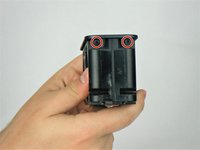
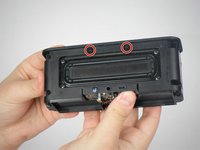
    • Remove the eight 1.6 mm Philips #1 screws from the sides, front, and back of the device using the Screwdriver J000 Philips Head.

    Chiedi a FixBot

    Aggiungi Commento

  5. Samsung Level Box Mini Buttons Replacement: passo 5, immagine 1 di 1
    • Remove the top of the device using the metal spudger.

    Chiedi a FixBot

    Aggiungi Commento

  6. Samsung Level Box Mini Buttons Replacement: passo 6, immagine 1 di 2 Samsung Level Box Mini Buttons Replacement: passo 6, immagine 2 di 2
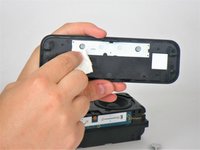
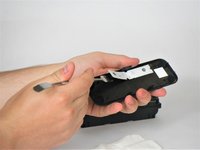
    • Clean the white plastic using a cloth. Remove the white plastic using the metal spudger.

    Chiedi a FixBot

    Aggiungi Commento

  7. Samsung Level Box Mini Buttons Replacement: passo 7, immagine 1 di 1
    • Clean the top of the buttons using a cloth.

    Chiedi a FixBot

    Aggiungi Commento

Conclusione

To reassemble your device, follow these instructions in reverse order.

Annulla: non ho completato questa guida.

Altre 2 persone hanno completato questa guida.

Team

USF Tampa, Team 1-4, Kass Spring 2017 Membro di USF Tampa, Team 1-4, Kass Spring 2017

USFT-KASS-S17S1G4

5 Membri

4 guide realizzate

0Commenti sulla guida

Aggiungi Commento

Visualizza statistiche:

Ultime 24 ore: 0

Ultimi 7 giorni: 1

Ultimi 30 giorni: 4

Tutti i Tempi: 1,957