Salta al contenuto principale
Unisciti alla Community delle riparazioni - Crea un account

Samsung Instinct LCD screen Replacement

Cosa ti serve

  1. Samsung Instinct LCD screen Replacement, Battery: passo 1, immagine 1 di 1
    • Apply pressure to the back cover and slide it forward towards the camera.

    • Lift the back cover off the phone.

    Chiedi a FixBot
  2. Samsung Instinct LCD screen Replacement: passo 2, immagine 1 di 1
    • Holding the phone firmly, use the notches to grip and lift up the battery.

    Chiedi a FixBot
  3. Samsung Instinct LCD screen Replacement, Back Case: passo 3, immagine 1 di 1
    • Remove the four 4.45mm screws at the corners of the phone.

    Chiedi a FixBot
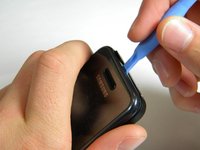
  4. Samsung Instinct LCD screen Replacement: passo 4, immagine 1 di 2 Samsung Instinct LCD screen Replacement: passo 4, immagine 2 di 2
    • Use the plastic opening tool to unhinge the locks around the edges of the phone.

    • Do not worry about the inner components of the phone; they are not connected to this case.

    Chiedi a FixBot
  5. Samsung Instinct LCD screen Replacement: passo 5, immagine 1 di 1
    • Lift the casing off of the phone.

    Chiedi a FixBot
  6. Samsung Instinct LCD screen Replacement, Antenna: passo 6, immagine 1 di 1
    • With the screws removed, locate the antenna.

    Chiedi a FixBot
  7. Samsung Instinct LCD screen Replacement: passo 7, immagine 1 di 1
    • Using a Phillips head screwdriver, remove the 4.50mm screw holding the antenna in place.

    Chiedi a FixBot
  8. Samsung Instinct LCD screen Replacement: passo 8, immagine 1 di 1
    • Using the plastic opener tool, squeeze gently on the antenna cable connector and lift to remove the connector from its position.

    Chiedi a FixBot
  9. Samsung Instinct LCD screen Replacement: passo 9, immagine 1 di 1
    • Gently lift up on the antenna and remove it from the back of the device.

    Chiedi a FixBot
  10. Samsung Instinct LCD screen Replacement, Front Case: passo 10, immagine 1 di 1
    • Remove the two 3.50mm screws connecting the motherboard to the case.

    Chiedi a FixBot
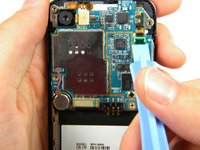
  11. Samsung Instinct LCD screen Replacement: passo 11, immagine 1 di 3 Samsung Instinct LCD screen Replacement: passo 11, immagine 2 di 3 Samsung Instinct LCD screen Replacement: passo 11, immagine 3 di 3
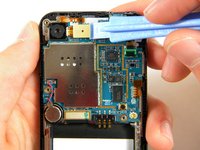
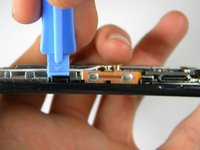
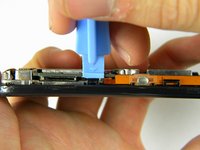
    • Use the plastic opener tool to detach the three ribbons on the motherboard.

    Chiedi a FixBot
  12. Samsung Instinct LCD screen Replacement: passo 12, immagine 1 di 1
    • Lift out the top right ribbon from its slot on the motherboard.

    Chiedi a FixBot
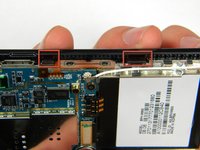
  13. Samsung Instinct LCD screen Replacement: passo 13, immagine 1 di 2 Samsung Instinct LCD screen Replacement: passo 13, immagine 2 di 2
    • Use the plastic opener tool to unhinge the the locks on the side of the motherboard connecting it to the front casing.

    Chiedi a FixBot
  14. Samsung Instinct LCD screen Replacement: passo 14, immagine 1 di 1
    • Lift the motherboard away from the front casing.

    Chiedi a FixBot
  15. Samsung Instinct LCD screen Replacement: passo 15, immagine 1 di 1
    • After removing lifting up on the motherboard, the front casing and center frame should be separated as shown.

    Chiedi a FixBot
  16. Samsung Instinct LCD screen Replacement, LCD screen: passo 16, immagine 1 di 1
    • Using the plastic opener tool, detach the ribbon located on the bottom of the phone below the battery compartment.

    Chiedi a FixBot
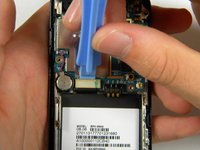
  17. Samsung Instinct LCD screen Replacement: passo 17, immagine 1 di 1
    • Lift the microchip (located at the bottom of the phone) and insert the plastic opener tool under the screen.

    • Lift up the screen. The microchip is attached to the screen and will be lifted out with the screen.

    Chiedi a FixBot
  18. Samsung Instinct LCD screen Replacement: passo 18, immagine 1 di 1
    • After lifting out the LCD screen, the screen and its housing should be separated as shown.

    Chiedi a FixBot
Conclusione

To reassemble your device, follow these instructions in reverse order.

Un'altra persona ha completato questa guida.

Patrick

Membro da: 10/11/11

75 Reputazione

2 guide realizzate

Team

Cal Poly, Team 3-13, Regan Fall 2011 Membro di Cal Poly, Team 3-13, Regan Fall 2011

CPSU-REGAN-F11S3G13

4 Membri

16 guide realizzate

0Commenti sulla guida

Aggiungi Commento

Visualizza statistiche:

Ultime 24 ore: 1

Ultimi 7 giorni: 11

Ultimi 30 giorni: 50

Tutti i Tempi: 1,867