Introduzione
This guide will show you how to replace your SIM card in your Samsung Galaxy Note 4. You may need this guide if your phone is having trouble connecting to the cellular network.
Cosa ti serve
-
-
-
Insert a fingernail or plastic opening tool into the divot to the left of the rear-facing camera.
-
Gently pry and twist the flexible rear cover off the back of the phone.
 Chiedi a FixBot
-
-
-
-
-
-
Insert a fingernail or plastic opening tool into the recess in the bottom right corner of the battery and lift upward.
-
Remove the battery.
-
-
-
-
-
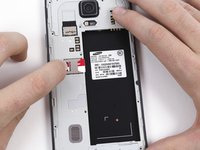
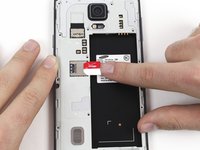
Remove the SIM card by first pushing the card slightly out of its housing, then pulling it the rest of the way.
-
-


To reassemble your device, follow these instructions in reverse order.
Annulla: non ho completato questa guida.
Altre 31 persone hanno completato questa guida.

Team

Cal Poly, Team 70-6, Forte Winter 2015 Membro di Cal Poly, Team 70-6, Forte Winter 2015
CPSU-FORTE-W15S70G6
4 Membri
29 guide realizzate
3Commenti sulla guida
Thanks too much
Many thanks my bro
Theres 5 pins next to sim card port. Can i ask..what is the purpose of that pin?
