Introduzione
This step illustrates how to properly change the batteries for the device. In addition, this step is a prerequisite for multiple manuals regarding this device.
Cosa ti serve
-
-
-
Flip the device to the backside, and locate the metal tab at the center of the back cover.
 Chiedi a FixBot
-
-
-
-
Lift the metal tab up, and rotate it counterclockwise. This will unlock the back case cover.
-
-
-
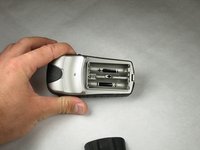
Lift the battery plate off to either insert or remove 2 AA batteries.
-
-


To reassemble your device, follow these instructions in reverse order.
Annulla: non ho completato questa guida.
Un'altra persona ha completato questa guida.

Team

Cal Poly, Team 21-30, Regan Fall 2010 Membro di Cal Poly, Team 21-30, Regan Fall 2010
CPSU-REGAN-F10S21G30
3 Membri
25 guide realizzate
