Salta al contenuto principale
Unisciti alla Community delle riparazioni - Crea un account

Remington MB4040 Battery Replacement

Cosa ti serve

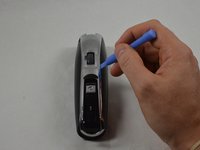
  1. Remington MB4040 Battery Replacement, Remove Blade Assembly: passo 1, immagine 1 di 3 Remington MB4040 Battery Replacement, Remove Blade Assembly: passo 1, immagine 2 di 3 Remington MB4040 Battery Replacement, Remove Blade Assembly: passo 1, immagine 3 di 3
    • Press the black button below the blade to remove the blade.

    Chiedi a FixBot
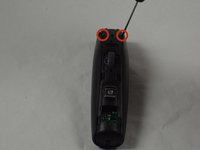
  2. Remington MB4040 Battery Replacement, Remove Back Cover Hardware: passo 2, immagine 1 di 2 Remington MB4040 Battery Replacement, Remove Back Cover Hardware: passo 2, immagine 2 di 2
    • Place the device so the back of the product is facing up.

    • Remove the two 11.0 mm PH00 screws from the black plastic housing at the bottom of the device.

    Chiedi a FixBot
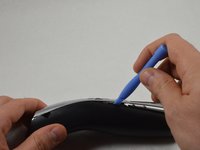
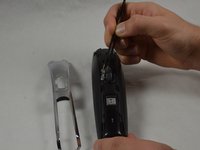
  3. Remington MB4040 Battery Replacement, Remove Front Cover Hardware: passo 3, immagine 1 di 3 Remington MB4040 Battery Replacement, Remove Front Cover Hardware: passo 3, immagine 2 di 3 Remington MB4040 Battery Replacement, Remove Front Cover Hardware: passo 3, immagine 3 di 3
    • Remove the chrome plated plastic piece by using the plastic opening tool to pry it from the housing assembly.

    • Remove the small clear plastic piece that covers the zoom wheel numbers.

    Chiedi a FixBot
  4. Remington MB4040 Battery Replacement, Front Cover (cont.): passo 4, immagine 1 di 2 Remington MB4040 Battery Replacement, Front Cover (cont.): passo 4, immagine 2 di 2
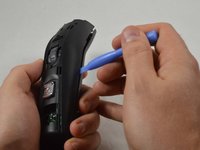
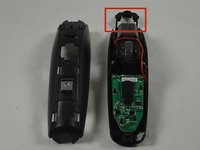
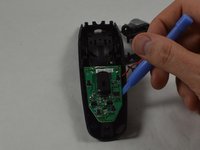
    • Remove the two 16.0 mm PH00 screws from the front cover.

    • Use the blue plastic opening tool to pry apart the two halves of the device.

    Chiedi a FixBot
  5. Remington MB4040 Battery Replacement, Blade Button Removal: passo 5, immagine 1 di 2 Remington MB4040 Battery Replacement, Blade Button Removal: passo 5, immagine 2 di 2
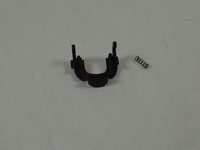
    • Remove the black blade button and the two 10.0 mm springs, which are sandwiched between the cover assembly halves.

    • The blade button is sandwiched between the halves and the two springs may fall out when the halves are separated.

    Chiedi a FixBot
  6. Remington MB4040 Battery Replacement, Remove Motherboard: passo 6, immagine 1 di 2 Remington MB4040 Battery Replacement, Remove Motherboard: passo 6, immagine 2 di 2
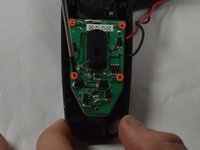
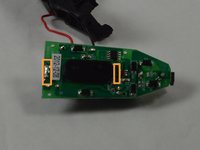
    • Remove the four 9.0 mm PH00 screws from the motherboard.

    • Use the plastic opening tool to remove the motherboard from its housing.

    • This can be completed with the Remington MB4040 Zoom Wheel Replacement installed or removed. Just adjust the zoom wheel until it no longer covers the motherboard.

    Chiedi a FixBot
  7. Remington MB4040 Battery Replacement, Remove Battery: passo 7, immagine 1 di 3 Remington MB4040 Battery Replacement, Remove Battery: passo 7, immagine 2 di 3 Remington MB4040 Battery Replacement, Remove Battery: passo 7, immagine 3 di 3
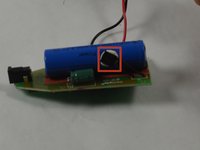
    • Remove the thermal switch from the battery by using the spudger to pry it from the adhesive.

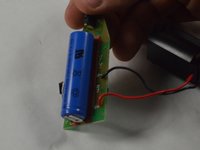
    • Remove the battery by desoldering the battery from the motherboard.

    • Soldering tabs hold the battery onto the motherboard.

    Chiedi a FixBot
Conclusione

To reassemble your device, follow these instructions in reverse order.

Altre 25 persone hanno completato questa guida.

Team

USF Tampa, Team 1-5, Blackwell Winter 2015 Membro di USF Tampa, Team 1-5, Blackwell Winter 2015

USFT-BLACKWELL-W15S1G5

3 Membri

14 guide realizzate

15Commenti sulla guida

Great work - but help on where to source the battery would be good too :)

Matt Purnell - Rispondi Condividi

It's available as a generic - it's a '14500' Li-Ion battery, 3.7V - typically 750-800mAh. Dimensions: 50mm x 14mm (diameter).

Matt Purnell - Rispondi Condividi

I have seen two types of these batteries: protected and unprotected. Which type do we need?

Amaury C - Rispondi Condividi

You did everyrhing except the most important part to me

How did you unsolder the battery, and solder the new battery?

I was going to buy the tools from the local store but realized i don't know how to appropriately unsolder/solder battery tabs.

Non the less you are the only one who made such explanation, thank you.

Rakan - Rispondi Condividi

If you happen to lose the two springs, you can cut off 2 pieces from the spring of a pen :P

Merry Trimming & A Happy New Beard !

Mads Larsen - Rispondi Condividi

Aggiungi Commento

Visualizza Statistiche:

Ultime 24 Ore: 9

Ultimi 7 Giorni: 44

Ultimi 30 Giorni: 291

Tutti i Tempi: 43,422