Salta al contenuto principale
Unisciti alla Community delle riparazioni - Crea un account

PowerMac G4 M5183 RAM

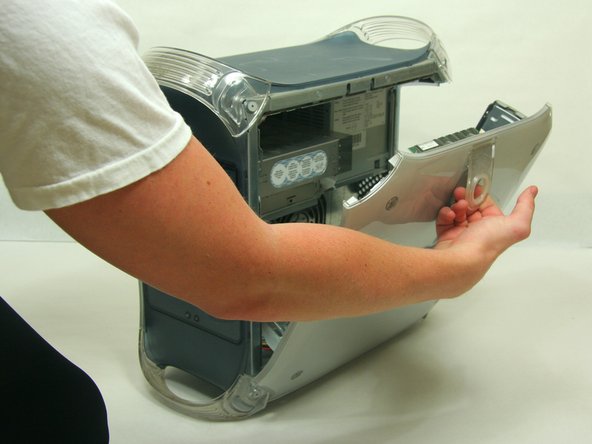
  1. PowerMac G4 M5183 RAM, Opening PowerMac G4 M5183 Case: passo 1, immagine 1 di 2 PowerMac G4 M5183 RAM, Opening PowerMac G4 M5183 Case: passo 1, immagine 2 di 2
    • Pull on outer latch.

    • Lower door until it is level with your work surface.

    • Before working on the computer make sure it is not plugged into a power supply, then touch a metal object. This discharges static electricity, which could damage the computer.

    Chiedi a FixBot
  2. PowerMac G4 M5183 RAM, RAM: passo 2, immagine 1 di 2 PowerMac G4 M5183 RAM, RAM: passo 2, immagine 2 di 2
    • Locate the RAM modules.

    • Pull side tabs outward. The RAM will pop out of the housing.

    Chiedi a FixBot
Linea Traguardo

Altre 13 persone hanno completato questa guida.

Team

Cal Poly, Team 13-24, Maness Winter 2010 Membro di Cal Poly, Team 13-24, Maness Winter 2010

CPSU-MANESS-W10S13G24

4 Membri

37 guide realizzate

0Commenti sulla guida

Aggiungi Commento

Visualizza statistiche:

Ultime 24 ore: 0

Ultimi 7 giorni: 10

Ultimi 30 giorni: 75

Tutti i Tempi: 7,353