Salta al contenuto principale
Unisciti alla Community delle riparazioni - Crea un account

Power Mac G5 PRAM Battery Replacement

  1. Power Mac G5 PRAM Battery Replacement, Side Panel: passo 1, immagine 1 di 1
    • To avoid electrocution, shut down the computer. Do not open the computer or attempt to install any items inside it while the computer is on.

    • To avoid being burned, wait at least 10 minutes to allow the computer's internal components to cool.

    Chiedi a FixBot

    Aggiungi Commento

  2. Power Mac G5 PRAM Battery Replacement: passo 2, immagine 1 di 1
    • Remove all the cables, including the power cables before opening the unit.

    Chiedi a FixBot

    Aggiungi Commento

  3. Power Mac G5 PRAM Battery Replacement: passo 3, immagine 1 di 2 Power Mac G5 PRAM Battery Replacement: passo 3, immagine 2 di 2
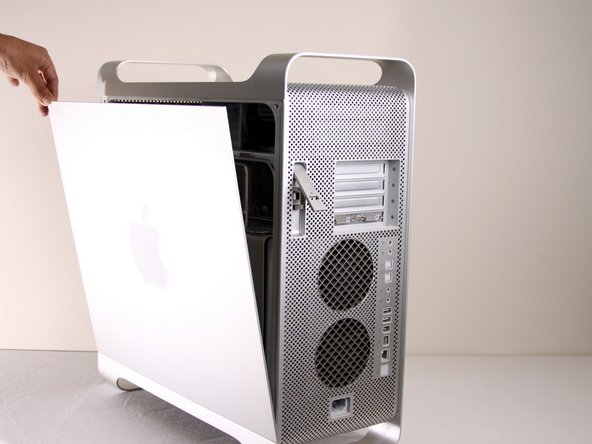
    • Lift the tab to unlock the side panel.

    • The panel should fall out. If the panel does not fall out by itself pull a little from the edges.

    Chiedi a FixBot

    Aggiungi Commento

  4. Power Mac G5 PRAM Battery Replacement: passo 4, immagine 1 di 3 Power Mac G5 PRAM Battery Replacement: passo 4, immagine 2 di 3 Power Mac G5 PRAM Battery Replacement: passo 4, immagine 3 di 3
    • Remove the air deflector (the clear plastic cover) by pulling on the handle.

    Chiedi a FixBot

    Aggiungi Commento

  5. Power Mac G5 PRAM Battery Replacement, PRAM Battery: passo 5, immagine 1 di 1
    • Locate the battery inside the desktop.

    Chiedi a FixBot

    Aggiungi Commento

  6. Power Mac G5 PRAM Battery Replacement: passo 6, immagine 1 di 3 Power Mac G5 PRAM Battery Replacement: passo 6, immagine 2 di 3 Power Mac G5 PRAM Battery Replacement: passo 6, immagine 3 di 3
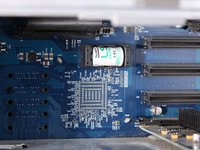
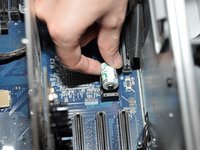
    • Remove the battery by lifting the battery from the battery terminal.

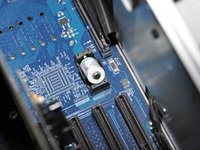
    • Be careful to note which end is positive and which is negative. The positive end should be facing away from the PCI slots.

    • It is important to lift the battery as straight up as possible to avoid damage to battery or terminal.

    • The first photo shows the correct battery position. The last two photos show the battery facing the WRONG WAY! Remember, the positive end should be facing AWAY from the PCI slots, NOT towards them.

    Chiedi a FixBot

    Aggiungi Commento

  7. Power Mac G5 PRAM Battery Replacement: passo 7, immagine 1 di 1
    • The area should look like this after the battery is removed.

    • Be sure to properly dispose of the old battery after removal (take it to the nearest hazardous waste center).

    • Only insert LS1425OC 3.6V battery to prevent damage to the logic board.

    Chiedi a FixBot

    Aggiungi Commento

Conclusione

To reassemble your device, follow these instructions in reverse order.

Annulla: non ho completato questa guida.

Altre 37 persone hanno completato questa guida.

Nolan

Membro da: 01/13/10

2.262 Reputazione

2 guide realizzate

Team

Cal Poly, Team 5-8, Forte Winter 2010 Membro di Cal Poly, Team 5-8, Forte Winter 2010

CPSU-FORTE-W10S5G8

7 Membri

30 guide realizzate

7Commenti sulla guida

plz advise the type of battery, thx !

adrianchan - Rispondi Condividi

Thank you, very very instructive - but why on Earth

does Apple not mark the battry holder on this model

with + and - ? ? Now, thanks to your close-up photo

I found out which way to turn the battery. (I hope)

Best regards

Torben, Denmark

Torben Hellborn - Rispondi Condividi

Agreed - slot should be marked with + and – . . .

Thanks for the clear and sharp photos d;-)

Andrew Lawes - Rispondi Condividi

This is not valid for the late 2005 model of G5…Model 11,2.

It uses a coin shaped Panasonic Lithium battery. I just ordered one from OWC.

($.88)

Sari - Rispondi Condividi

Grazie, molto utile! Alberto da Venezia

favarettostudio - Rispondi Condividi

Aggiungi Commento

Visualizza statistiche:

Ultime 24 ore: 8

Ultimi 7 giorni: 66

Ultimi 30 giorni: 232

Tutti i Tempi: 80,397