Salta al contenuto principale
Unisciti alla Community delle riparazioni - Crea un account

Power Mac G4 Cube RAM Replacement

Cosa ti serve

  1. Power Mac G4 Cube RAM Replacement, Outer Case: passo 1, immagine 1 di 3 Power Mac G4 Cube RAM Replacement, Outer Case: passo 1, immagine 2 di 3 Power Mac G4 Cube RAM Replacement, Outer Case: passo 1, immagine 3 di 3
    • Release the back handle of the PowerMac. Slowly pull out the cube by holding the end of the handle. Watch for any parts that may become entangled with the outer case.

    • Push back the handle after you have taken the core out of the case.

    Chiedi a FixBot

    Aggiungi Commento

  2. Power Mac G4 Cube RAM Replacement: passo 2, immagine 1 di 2 Power Mac G4 Cube RAM Replacement: passo 2, immagine 2 di 2
    • Place the cube upside down and remove the four T10 Torx screws on the front plate. Then remove the two screws on each side.

    Chiedi a FixBot

    Aggiungi Commento

  3. Power Mac G4 Cube RAM Replacement: passo 3, immagine 1 di 1
    • Slowly lift the plate off the cube and disconnect the power cord.

    Chiedi a FixBot

    Aggiungi Commento

  4. Power Mac G4 Cube RAM Replacement: passo 4, immagine 1 di 1
    • Remove the four pillars from each corner.

    • The pillars should come out fairly easily.

    Chiedi a FixBot

    Aggiungi Commento

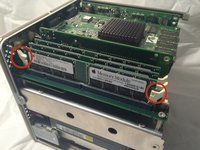
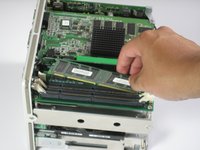
  5. Power Mac G4 Cube RAM Replacement, RAM: passo 5, immagine 1 di 2 Power Mac G4 Cube RAM Replacement, RAM: passo 5, immagine 2 di 2
    • Flip the two latches on the side of the RAM chip.

    • Remove the chip from the logic board and replace with new RAM.

    Chiedi a FixBot

    Aggiungi Commento

Conclusione

To reassemble your device, follow these instructions in reverse order.

Annulla: non ho completato questa guida.

Altre 11 persone hanno completato questa guida.

Ryan Chun

Membro da: 06/24/10

1.076 Reputazione

7 guide realizzate

Team

Cal Poly, Team 2-7, Johann Summer 2010 Membro di Cal Poly, Team 2-7, Johann Summer 2010

CPSU-JOHANN-R10S2G7

5 Membri

21 guide realizzate

1Commento della guida

Unless you have really fat fingers, you shouldn’t need to remove the metal plate and pillars. I’m able to replace the RAM without those steps.

Chris Sebes - Rispondi Condividi

Aggiungi Commento

Visualizza statistiche:

Ultime 24 ore: 0

Ultimi 7 giorni: 31

Ultimi 30 giorni: 137

Tutti i Tempi: 6,520