Salta al contenuto principale
Unisciti alla Community delle riparazioni - Crea un account

Polaroid OneStep 2 Flash Cover Replacement

Cosa ti serve

  1. Polaroid OneStep 2 Flash Cover Replacement, Flash Cover: passo 1, immagine 1 di 3 Polaroid OneStep 2 Flash Cover Replacement, Flash Cover: passo 1, immagine 2 di 3 Polaroid OneStep 2 Flash Cover Replacement, Flash Cover: passo 1, immagine 3 di 3
    • Unscrew the four 5mm screws on the base of the camera. Remove the two pieces of the base.

    Chiedi a FixBot

    Aggiungi Commento

  2. Polaroid OneStep 2 Flash Cover Replacement: passo 2, immagine 1 di 3 Polaroid OneStep 2 Flash Cover Replacement: passo 2, immagine 2 di 3 Polaroid OneStep 2 Flash Cover Replacement: passo 2, immagine 3 di 3
    • Unscrew the four 5mm screws on the top of the inside base piece.

    • Unscrew the two 5mm screws on the bottom of the inside base piece which is near the strap.

    Chiedi a FixBot

    Aggiungi Commento

  3. Polaroid OneStep 2 Flash Cover Replacement: passo 3, immagine 1 di 1
    • Remove the inside black base piece.

    Chiedi a FixBot

    Aggiungi Commento

  4. Polaroid OneStep 2 Flash Cover Replacement: passo 4, immagine 1 di 2 Polaroid OneStep 2 Flash Cover Replacement: passo 4, immagine 2 di 2
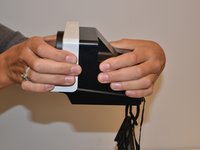
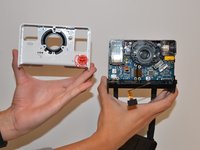
    • With force separate the front white piece from the back of the camera. You will use your hands to pull it apart.

    Chiedi a FixBot

    Aggiungi Commento

  5. Polaroid OneStep 2 Flash Cover Replacement: passo 5, immagine 1 di 2 Polaroid OneStep 2 Flash Cover Replacement: passo 5, immagine 2 di 2
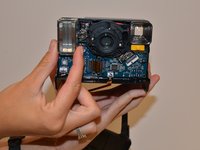
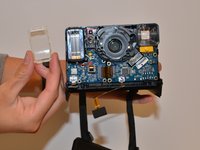
    • Forcefully pull on the flash cover until it is removed.

    Chiedi a FixBot

    Aggiungi Commento

Conclusione

To reassemble your device, follow these instructions in reverse order.

Annulla: non ho completato questa guida.

Altre 2 persone hanno completato questa guida.

0Commenti sulla guida

Aggiungi Commento

Visualizza statistiche:

Ultime 24 ore: 1

Ultimi 7 giorni: 12

Ultimi 30 giorni: 41

Tutti i Tempi: 1,975