Salta al contenuto principale
Unisciti alla Community delle riparazioni - Crea un account

Pentax PZ-10 Back Cover Locking Switch Spring Replacement

Cosa ti serve

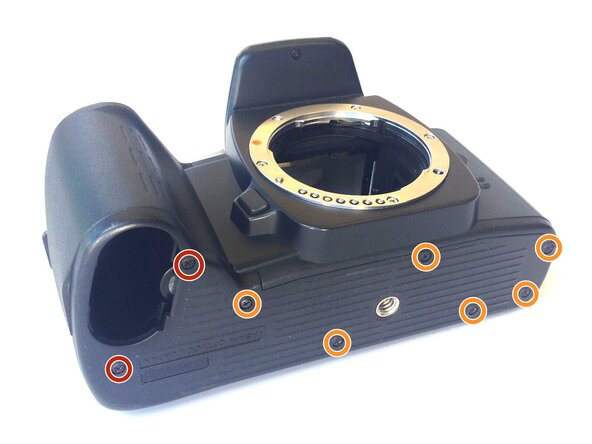
  1. Pentax PZ-10 Back Cover Locking Switch Spring Replacement, Removing the Bottom Cover: passo 1, immagine 1 di 1
    • With the lens face up and the bottom panel of the camera facing you, remove the two 7mm screws on the left using the J0 screwdriver.

    • Remove the six 4.3mm screws in the middle and right of the panel using the J0 screwdriver.

    • Pull off the bottom casing to remove.

    Chiedi a FixBot
  2. Pentax PZ-10 Back Cover Locking Switch Spring Replacement, Removing Bottom Casing: passo 2, immagine 1 di 1
    • With the screws removed, the bottom casing should come off very easily by pulling on the casing.

    Chiedi a FixBot
  3. Pentax PZ-10 Back Cover Locking Switch Spring Replacement, Removing the Back Cover: passo 3, immagine 1 di 1
    • Place the camera on its side so the lens is facing left.

    • Press down on the locking switch on the side panel facing you.

    Chiedi a FixBot
  4. Pentax PZ-10 Back Cover Locking Switch Spring Replacement: passo 4, immagine 1 di 1
    • With the door unlocked, rotate the device to access the bottom.

    Chiedi a FixBot
  5. Pentax PZ-10 Back Cover Locking Switch Spring Replacement: passo 5, immagine 1 di 1
    Strumento utilizzato in questo passaggio:
    Tweezers
    $4.99
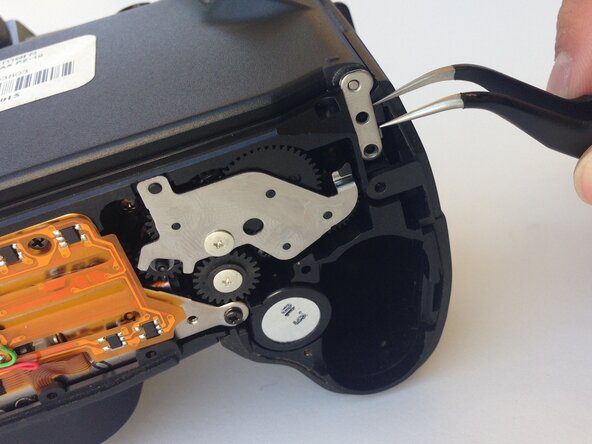
    • Using a pair of tweezers, gently remove the metal tab securing the back door axle.

    • The door will come loose at this point, watch for any loose parts that may also come out.

    Chiedi a FixBot
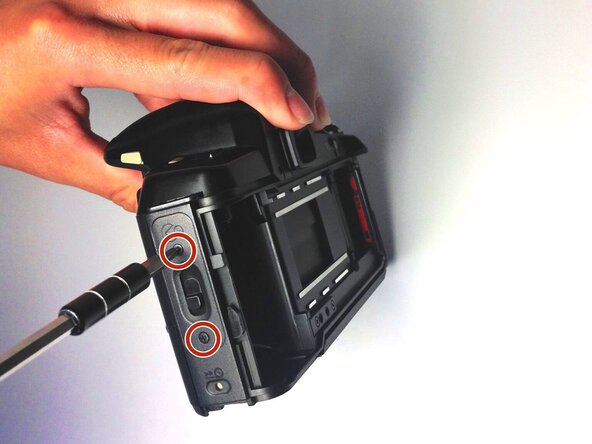
  6. Pentax PZ-10 Back Cover Locking Switch Spring Replacement, Removing the Side Panel: passo 6, immagine 1 di 1
    • Once the back cover is fully removed, remove the two 4.35mm screws attaching the cover of the unlocking switch, and remove the plate.

    Chiedi a FixBot
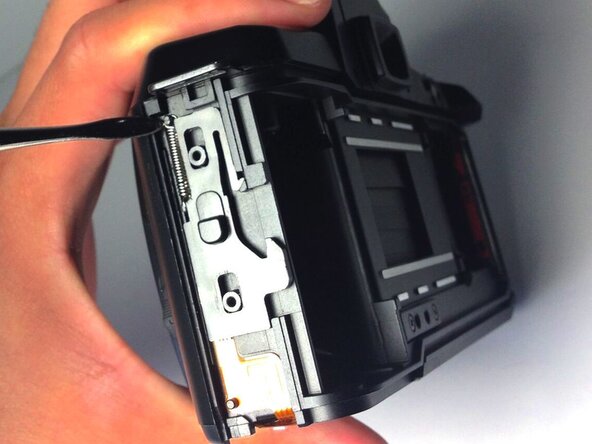
  7. Pentax PZ-10 Back Cover Locking Switch Spring Replacement, Removing the Spring: passo 7, immagine 1 di 1
    • Locate the spring at the upper left corner of the face, and pull the rings of the spring off of the pins to remove it using plastic opening tools.

    • You are now ready to replace the spring.

    Chiedi a FixBot
Conclusione

To reassemble your device, follow these instructions in reverse order.

Un'altra persona ha completato questa guida.

Ryan Su

Membro da: 04/20/15

107 Reputazione

Una guida realizzata

0Commenti sulla guida

Aggiungi Commento

Visualizza statistiche:

Ultime 24 ore: 1

Ultimi 7 giorni: 6

Ultimi 30 giorni: 34

Tutti i Tempi: 691