Salta al contenuto principale
Unisciti alla Community delle riparazioni - Crea un account

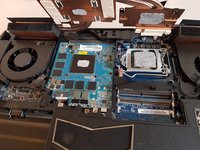
P775DM3 CPU Replacement

Cosa ti serve

    1. P775DM3 CPU Replacement, Battery: passo 1, immagine 1 di 2 P775DM3 CPU Replacement, Battery: passo 1, immagine 2 di 2
      • Unlock the lock circled in red.

      Chiedi a FixBot
      Aggiungi Commento

    2. P775DM3 CPU Replacement: passo 2, immagine 1 di 3 P775DM3 CPU Replacement: passo 2, immagine 2 di 3 P775DM3 CPU Replacement: passo 2, immagine 3 di 3
      • Lift the battery while unlocking the lock circled in red.

      Chiedi a FixBot

      Aggiungi Commento

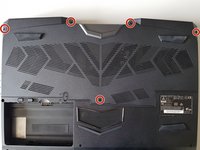
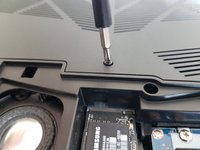
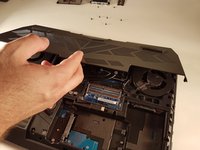
    1. P775DM3 CPU Replacement, Access to major components: passo 3, immagine 1 di 2 P775DM3 CPU Replacement, Access to major components: passo 3, immagine 2 di 2
      • Unscrew the five screws circled in red.

      Chiedi a FixBot

      Aggiungi Commento

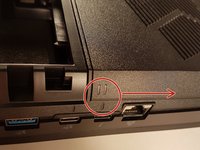
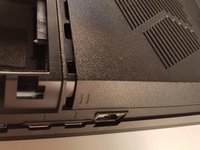
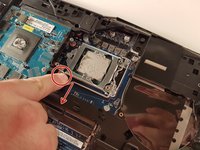
    2. P775DM3 CPU Replacement: passo 4, immagine 1 di 2 P775DM3 CPU Replacement: passo 4, immagine 2 di 2
      • Slide the plate in the direction of the red arrow.

      Chiedi a FixBot

      Aggiungi Commento

    3. P775DM3 CPU Replacement: passo 5, immagine 1 di 2 P775DM3 CPU Replacement: passo 5, immagine 2 di 2
      • Lift the plate.

      Chiedi a FixBot
      Aggiungi Commento

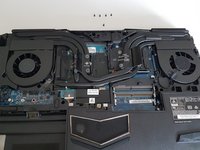
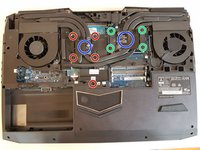
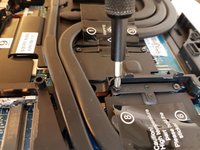
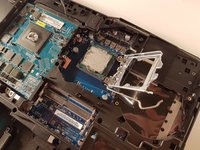
    1. P775DM3 CPU Replacement, Cooler: passo 6, immagine 1 di 3 P775DM3 CPU Replacement, Cooler: passo 6, immagine 2 di 3 P775DM3 CPU Replacement, Cooler: passo 6, immagine 3 di 3
      • Unscrew the four large screws circled in green

      • Unscrew the five small screws circled in red

      • Lift the cooler with the two tabs circled in blue

      Chiedi a FixBot
      Aggiungi Commento

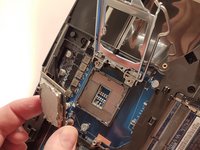
    1. P775DM3 CPU Replacement, CPU: passo 7, immagine 1 di 3 P775DM3 CPU Replacement, CPU: passo 7, immagine 2 di 3 P775DM3 CPU Replacement, CPU: passo 7, immagine 3 di 3
      • Pull the lever circled in red in the direction of the red arrow while pressing on it.

      • Attention: Don't touch the underside of the processor, pick it up from the sides.

      Chiedi a FixBot
      Aggiungi Commento

Conclusione

To reassemble your device follow the following instructions in reverse order

Annulla: non ho completato questa guida.

Un ringraziamento speciale a questi traduttori:

fr en

100%

Questi traduttori ci stanno aiutando ad aggiustare il mondo! Vuoi partecipare?
Inizia a tradurre ›

Felice Suglia

Membro da: 06/15/13

33.634 Reputazione

283 guide realizzate

0Commenti sulla guida

Aggiungi Commento

Visualizza statistiche:

Ultime 24 ore: 1

Ultimi 7 giorni: 7

Ultimi 30 giorni: 38

Tutti i Tempi: 706