Salta al contenuto principale
Unisciti alla Community delle riparazioni - Crea un account

Oculus Rift CV1 Remote Button Replacement

Cosa ti serve

    1. Oculus Rift CV1 Remote Button Replacement, Battery: passo 1, immagine 1 di 3 Oculus Rift CV1 Remote Button Replacement, Battery: passo 1, immagine 2 di 3 Oculus Rift CV1 Remote Button Replacement, Battery: passo 1, immagine 3 di 3
      • Remove the back panel by firmly sliding it towards the strap.

      Chiedi a FixBot

      Aggiungi Commento

    2. Oculus Rift CV1 Remote Button Replacement: passo 2, immagine 1 di 3 Oculus Rift CV1 Remote Button Replacement: passo 2, immagine 2 di 3 Oculus Rift CV1 Remote Button Replacement: passo 2, immagine 3 di 3
      • Push down on the tab under the battery.

      • Firmly slide the battery away from you. The battery should unlatch from its previous position.

      • Once the battery is removed, release the tab.

      Chiedi a FixBot

      Aggiungi Commento

    1. Oculus Rift CV1 Remote Button Replacement, Remote Button: passo 3, immagine 1 di 1
      • Remove the four 4mm Phillips #000 screws from the back of the remote.

      Chiedi a FixBot

      Aggiungi Commento

    2. Oculus Rift CV1 Remote Button Replacement: passo 4, immagine 1 di 1
      • Gently lift the wrist strap to split the back panel into two.

      Chiedi a FixBot

      Aggiungi Commento

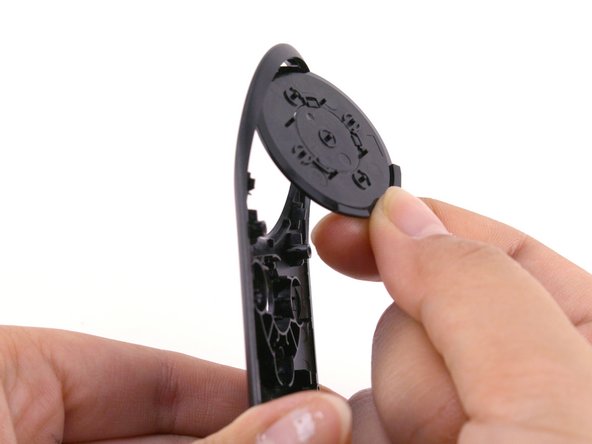
    3. Oculus Rift CV1 Remote Button Replacement: passo 5, immagine 1 di 2 Oculus Rift CV1 Remote Button Replacement: passo 5, immagine 2 di 2
      • Gently peel off the top of the control board.

      • Be gentle, if the buttons fall off, try to keep them in the orientation that they were in.

      • If the large black button falls off, place it back into the shell by orienting the tabs on the button to match the holes on the shell.

      Chiedi a FixBot

      Aggiungi Commento

    4. Oculus Rift CV1 Remote Button Replacement: passo 6, immagine 1 di 1
      • Pull the old buttons off and replace them with the new ones.

      Chiedi a FixBot

      Aggiungi Commento

Conclusione

To reassemble your device, follow these instructions in reverse order.

Annulla: non ho completato questa guida.

Team

Cal Poly, Team S18-G4, White Winter 2019 Membro di Cal Poly, Team S18-G4, White Winter 2019

CPSU-WHITE-W19S18G4

3 Membri

20 guide realizzate

0Commenti sulla guida

Aggiungi Commento

Visualizza statistiche:

Ultime 24 ore: 0

Ultimi 7 giorni: 8

Ultimi 30 giorni: 32

Tutti i Tempi: 1,346