Salta al contenuto principale
Unisciti alla Community delle riparazioni - Crea un account

OPPO N1 Battery Replacement

Cosa ti serve

  1. OPPO N1 Battery Replacement, Rear Case: passo 1, immagine 1 di 1
    • Insert the plastic opening tool into the crevice. The back cover is most easily opened by starting at this location.

    Chiedi a FixBot

    Aggiungi Commento

  2. OPPO N1 Battery Replacement: passo 2, immagine 1 di 2 OPPO N1 Battery Replacement: passo 2, immagine 2 di 2
    • In the photo we rotated the phone ninety degrees counterclockwise.

    • Gently slide the plastic opening tool around the edge of the phone to release the back cover from the phone. You may hear some snapping noises as you release the back cover.

    • The rear case should then come free.

    Chiedi a FixBot

    Aggiungi Commento

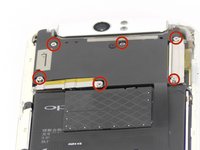
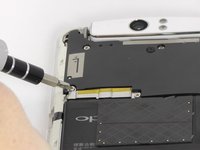
  3. OPPO N1 Battery Replacement, Battery: passo 3, immagine 1 di 2 OPPO N1 Battery Replacement, Battery: passo 3, immagine 2 di 2
    • Remove the six 4mm long screws holding the motherboard in with the ph0 Phillips head screw driver.

    Chiedi a FixBot

    Aggiungi Commento

  4. OPPO N1 Battery Replacement: passo 4, immagine 1 di 1
    Strumento utilizzato in questo passaggio:
    Tweezers
    $4.99
    • Use the tweezers or your fingers to remove the sliver plates.

    Chiedi a FixBot

    Aggiungi Commento

  5. OPPO N1 Battery Replacement: passo 5, immagine 1 di 1
    • Remove the black plate with your fingers.

    Chiedi a FixBot

    Aggiungi Commento

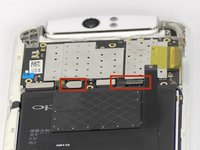
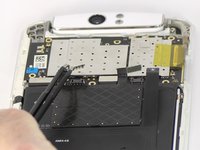
  6. OPPO N1 Battery Replacement: passo 6, immagine 1 di 3 OPPO N1 Battery Replacement: passo 6, immagine 2 di 3 OPPO N1 Battery Replacement: passo 6, immagine 3 di 3
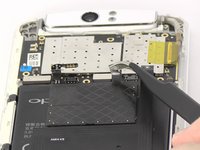
    • Use tweezers or your fingers to pull up the connector tabs.

    Chiedi a FixBot

    Aggiungi Commento

  7. OPPO N1 Battery Replacement: passo 7, immagine 1 di 2 OPPO N1 Battery Replacement: passo 7, immagine 2 di 2
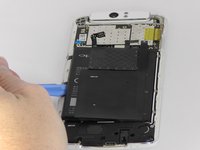
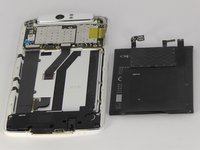
    • Use the blue opening tool to carefully pry the battery from the sticky tape that attaches it to the device.

    Chiedi a FixBot

    Aggiungi Commento

Conclusione

To reassemble your device, follow these instructions in reverse order.

Annulla: non ho completato questa guida.

Altre 17 persone hanno completato questa guida.

Joshua Stone

Membro da: 09/26/14

1.067 Reputazione

5 guide realizzate

Team

USF Tampa, Team 13-5, Staggers Fall 2014 Membro di USF Tampa, Team 13-5, Staggers Fall 2014

USFT-STAGGERS-F14S13G5

3 Membri

14 guide realizzate

4Commenti sulla guida

And where can I find that battery? What is the battery's id number? ebay doesn't show any. Just oppo n1 mini.

djkleinen - Rispondi Condividi

Hi bigupbattery.com has them cheapest I've found the number is part no blp557

simon watling - Rispondi Condividi

@simon watling

Omg, so big thanks, man! You just saved many euros for me!

djkleinen - Rispondi Condividi

How hard is it to pry the battery off the phone?

arkanista - Rispondi Condividi

Aggiungi Commento

Visualizza statistiche:

Ultime 24 ore: 2

Ultimi 7 giorni: 4

Ultimi 30 giorni: 51

Tutti i Tempi: 24,416