Salta al contenuto principale
Unisciti alla Community delle riparazioni - Crea un account

Nokia XL Dual SIM Disassembly

Solo Prerequisita
Questa è una guida che contiene solo i prerequisiti! Questa guida fa parte di un'altra procedura e non è destinata ad essere utilizzata da sola.

Cosa ti serve

  1. Nokia XL Dual SIM Disassembly, Back Cover Removal: passo 1, immagine 1 di 1
    • You will first need to separate the back cover from the device.

    • Gently pry open each side of the device at the indicated locations. It is best to use a plastic opening tool or similar tool.

    Chiedi a FixBot
  2. Nokia XL Dual SIM Disassembly, Battery Removal: passo 2, immagine 1 di 2 Nokia XL Dual SIM Disassembly, Battery Removal: passo 2, immagine 2 di 2
    • Remove the back cover.

    • Use a plastic opening tool to lift the battery. Then, remove it.

    Chiedi a FixBot
  3. Nokia XL Dual SIM Disassembly, Screen Separation part 1: passo 3, immagine 1 di 2 Nokia XL Dual SIM Disassembly, Screen Separation part 1: passo 3, immagine 2 di 2
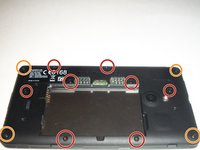
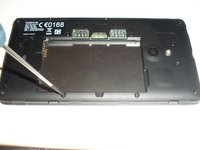
    • To access the inner components of the device, remove the various screws. Keep them separate, and organize them by size.

    • You will need a T5 Precision Torx screw driver to remove the screws.

    • The locations of the T5x3.4mm screws are indicated in the picture.

    • The locations of the T5x4.1mm screws are indicated in the picture.

    Chiedi a FixBot
  4. Nokia XL Dual SIM Disassembly, Screen Separation part 2: passo 4, immagine 1 di 3 Nokia XL Dual SIM Disassembly, Screen Separation part 2: passo 4, immagine 2 di 3 Nokia XL Dual SIM Disassembly, Screen Separation part 2: passo 4, immagine 3 di 3
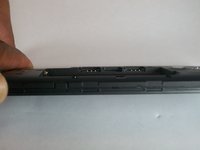
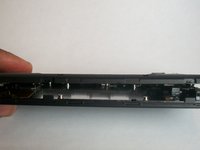
    • Use the plastic opening tool to gently pry the device apart.

    • There are flaps on both sides of the phone as indicated in the picture. This is what you will need to pry apart.

    • Please be cautious when opening the device. There are various connectors inside the device that must be handled with care.

    Chiedi a FixBot
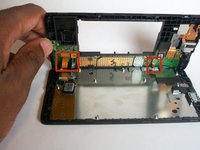
  5. Nokia XL Dual SIM Disassembly, System components: passo 5, immagine 1 di 1
    • Once the device is open, take note of all the components.

    Chiedi a FixBot
Conclusione

To reassemble your device, follow these instructions in reverse order.

Un'altra persona ha completato questa guida.

Team

USF Tampa, Team 1-4, Brown Fall 2014 Membro di USF Tampa, Team 1-4, Brown Fall 2014

USFT-BROWN-F14S1G4

3 Membri

7 guide realizzate

0Commenti sulla guida

Aggiungi Commento

Visualizza statistiche:

Ultime 24 ore: 0

Ultimi 7 giorni: 0

Ultimi 30 giorni: 44

Tutti i Tempi: 428