Questa traduzione è stata generata automaticamente e non è stata ancora revisionata da una persona. Parli questa lingua? Dai un’occhiata.
Cosa ti serve
-
-
-
Inizia con il telefono in posizione aperta.
-
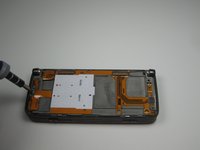
Devi rimuovere l'adesivo al centro, sotto lo schermo, per scoprire la vite centrale.
-
Usa un cacciavite T5 per rimuovere tutte e tre le viti, allentando lo schermo anteriore.
 Chiedi a FixBot
-
-
-
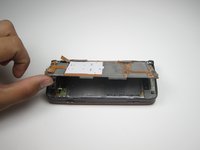
Chiudi il telefono e ruotalo verso la schermata anteriore.
-
La copertura anteriore sarà ora abbastanza allentata da poter essere rimossa afferrandone i bordi e tirandola leggermente.
-
-
-
-
-
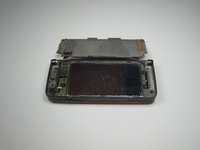
Con la copertura anteriore rimossa, lo schermo e il tastierino dovrebbero essere liberi.
-
-
-
-
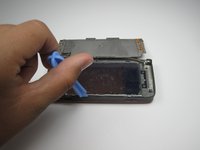
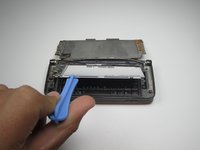
Usa uno strumento di apertura in plastica per sollevare il cavo che collega lo schermo LCD al resto del telefono.
-
Con il cavo scollegato, lo schermo dovrebbe essere libero per la rimozione o per l'installazione di uno schermo sostitutivo.
-
-
-
-
-
Dopo aver rimosso lo schermo anteriore e la tastiera anteriore, il tuo dispositivo dovrebbe apparire così.
-
-
-
Assicurati di rimuovere la connessione mostrata inserendo delicatamente lo strumento di apertura in plastica sotto la connessione e facendo leva leggermente per staccarla.
-
-
-
Usando lo strumento di apertura in plastica, solleva e rimuovi lo schermo interno.
-
-


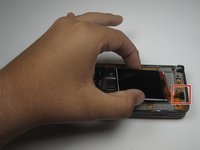
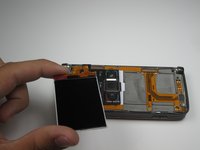


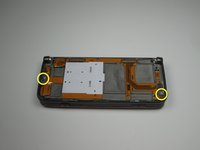
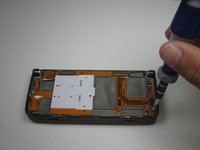





Per installare un nuovo schermo, segui semplicemente i passaggi nell'ordine inverso con lo schermo sostitutivo.
Annulla: non ho completato questa guida.
Altre 5 persone hanno completato questa guida.

Team

Cal Poly, Team 18-21, Garner Spring 2011 Membro di Cal Poly, Team 18-21, Garner Spring 2011
CPSU-GARNER-S11S18G21
3 Membri
84 guide realizzate
