Salta al contenuto principale
Unisciti alla Community delle riparazioni - Crea un account

Nintendo WaveBird Wireless Controller Channel Wheel Replacement

Cosa ti serve

  1. Nintendo WaveBird Wireless Controller Channel Wheel Replacement, Batteries: passo 1, immagine 1 di 2 Nintendo WaveBird Wireless Controller Channel Wheel Replacement, Batteries: passo 1, immagine 2 di 2
    • Pull down on the battery cover release lever and pull back to remove the cover.

    Chiedi a FixBot

    Aggiungi Commento

  2. Nintendo WaveBird Wireless Controller Channel Wheel Replacement: passo 2, immagine 1 di 1
    • Remove both batteries from the device.

    Chiedi a FixBot

    Aggiungi Commento

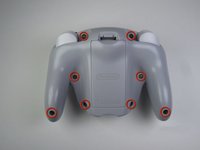
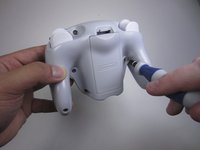
  3. Nintendo WaveBird Wireless Controller Channel Wheel Replacement, Front Panel: passo 3, immagine 1 di 2 Nintendo WaveBird Wireless Controller Channel Wheel Replacement, Front Panel: passo 3, immagine 2 di 2
    • Remove the eight 9 mm screws from the back panel using the Tri-point Y1 screwdriver.

    • During reassembly, firmly hold the panels of the controller together while replacing the screws so the panels do not separate.

    Chiedi a FixBot

    Aggiungi Commento

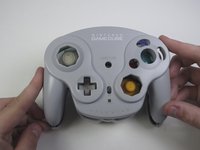
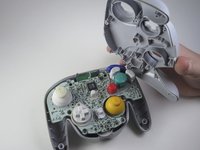
  4. Nintendo WaveBird Wireless Controller Channel Wheel Replacement: passo 4, immagine 1 di 2 Nintendo WaveBird Wireless Controller Channel Wheel Replacement: passo 4, immagine 2 di 2
    • Carefully turn over the controller and place it on a flat surface.

    • Slowly separate the top panel from the bottom panel.

    • The buttons are loose and may fall off the motherboard.

    • Once separated, set aside the top panel.

    • During reassembly, make sure the front panel lines up with the buttons so they slide back into place.

    Chiedi a FixBot

    Aggiungi Commento

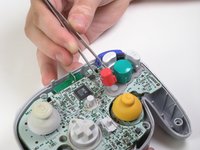
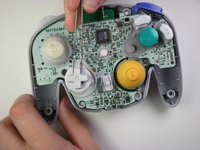
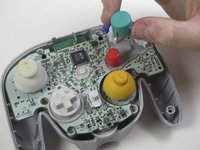
  5. Nintendo WaveBird Wireless Controller Channel Wheel Replacement, Buttons: passo 5, immagine 1 di 3 Nintendo WaveBird Wireless Controller Channel Wheel Replacement, Buttons: passo 5, immagine 2 di 3 Nintendo WaveBird Wireless Controller Channel Wheel Replacement, Buttons: passo 5, immagine 3 di 3
    Strumento utilizzato in questo passaggio:
    Tweezers
    $4.99
    • Use tweezers to remove the buttons.

    • It may be easier to remove the A button off of the pad by lifting it with your fingers.

    • During reassembly, make sure all buttons are in their respective sockets so they match up with the front panel.

    Chiedi a FixBot

    Aggiungi Commento

  6. Nintendo WaveBird Wireless Controller Channel Wheel Replacement, Motherboard: passo 6, immagine 1 di 1
    Strumento utilizzato in questo passaggio:
    Tweezers
    $4.99
    • Using tweezers remove the three grey button pads from the motherboard.

    Chiedi a FixBot

    Aggiungi Commento

  7. Nintendo WaveBird Wireless Controller Channel Wheel Replacement: passo 7, immagine 1 di 1
    • With your fingers gently grip the motherboard on both sides and lift it away from the back panel.

    • To put the motherboard back into place, align the two metal clips under the motherboard with the slots in the back panel. The motherboard should fall into place.

    Chiedi a FixBot

    Aggiungi Commento

  8. Nintendo WaveBird Wireless Controller Channel Wheel Replacement, Channel Wheel: passo 8, immagine 1 di 1
    • Turn the motherboard over so the channel wheel is facing up.

    Chiedi a FixBot

    Aggiungi Commento

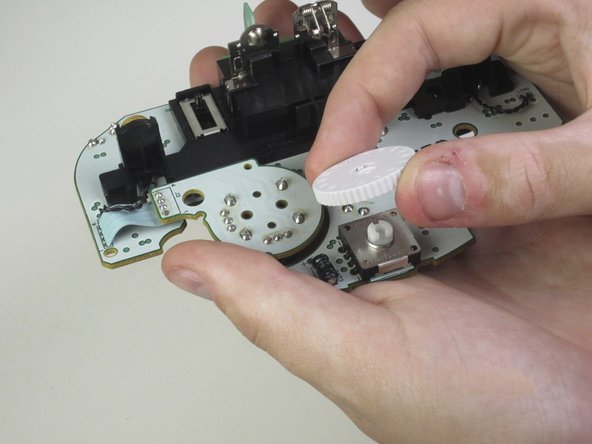
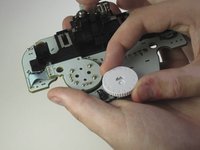
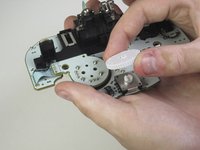
  9. Nintendo WaveBird Wireless Controller Channel Wheel Replacement: passo 9, immagine 1 di 2 Nintendo WaveBird Wireless Controller Channel Wheel Replacement: passo 9, immagine 2 di 2
    • Pinch the wheel and pull it away from the motherboard.

    Chiedi a FixBot

    Aggiungi Commento

Conclusione

To reassemble your device, follow these instructions in reverse order.

Annulla: non ho completato questa guida.

Un'altra persona ha completato questa guida.

Team

Cal Poly, Team 10-40, Amido Spring 2013 Membro di Cal Poly, Team 10-40, Amido Spring 2013

CPSU-AMIDO-S13S10G40

4 Membri

37 guide realizzate

0Commenti sulla guida

Aggiungi Commento

Visualizza statistiche:

Ultime 24 ore: 4

Ultimi 7 giorni: 13

Ultimi 30 giorni: 46

Tutti i Tempi: 2,727