Salta al contenuto principale
Unisciti alla Community delle riparazioni - Crea un account

Nintendo 3DS 2015 Touchscreen Assembly Replacement

Cosa ti serve

  1. Nintendo 3DS 2015 Touchscreen Assembly Replacement, Battery: passo 1, immagine 1 di 1
    • Unscrew the two 3mm Phillips #1 head screws along the top edge of the device.

    • The screws on the back panel strip easily. Go slowly and press down firmly.

    • The screws on the back panel are held in by locking washers, so they won't come out of the back panel.

    Chiedi a FixBot
  2. Nintendo 3DS 2015 Touchscreen Assembly Replacement: passo 2, immagine 1 di 2 Nintendo 3DS 2015 Touchscreen Assembly Replacement: passo 2, immagine 2 di 2
    • Pull the top corner tabs of the front face plate outward and towards you.

    • Pull the faceplate up and out of the slots at the bottom of the device.

    • Set aside the back faceplate.

    Chiedi a FixBot
  3. Nintendo 3DS 2015 Touchscreen Assembly Replacement: passo 3, immagine 1 di 3 Nintendo 3DS 2015 Touchscreen Assembly Replacement: passo 3, immagine 2 di 3 Nintendo 3DS 2015 Touchscreen Assembly Replacement: passo 3, immagine 3 di 3
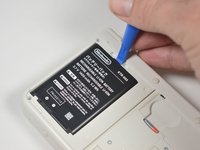
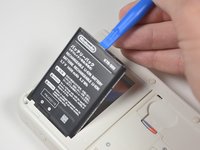
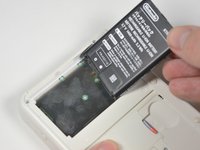
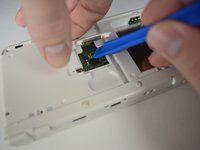
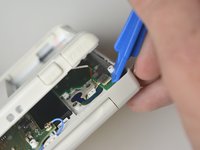
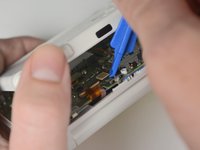
    • Insert a plastic opening tool into the notch at the top of the battery.

    • Pry the battery up with the plastic opening tool.

    Chiedi a FixBot
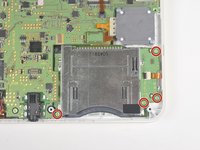
  4. Nintendo 3DS 2015 Touchscreen Assembly Replacement, SD Card Reader: passo 4, immagine 1 di 1
    • Unscrew the three 3mm Y0 screws along the right and bottom of the SD card reader.

    • The bottom of the SD card reader should slightly pop out after removing the screws.

    Chiedi a FixBot
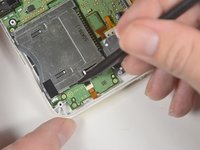
  5. Nintendo 3DS 2015 Touchscreen Assembly Replacement: passo 5, immagine 1 di 1
    • Pull the SD card reader from the edge with two holes gently to free the tab at the top of the SD card reader.

    • Don't completely pull the SD card out of the device yet. There is a ribbon cable connected under the SD card reader.

    • Reorient the device so that the power jack faces you.

    Chiedi a FixBot
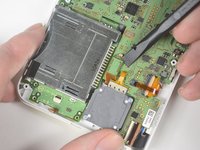
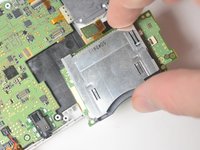
  6. Nintendo 3DS 2015 Touchscreen Assembly Replacement: passo 6, immagine 1 di 2 Nintendo 3DS 2015 Touchscreen Assembly Replacement: passo 6, immagine 2 di 2
    • Lift the SD card reader gently.

    • Use a plastic opening tool to pry the SD card ribbon cable off the socket on the motherboard.

    • Lift the SD card reader out off of the lower casing.

    Chiedi a FixBot
  7. Nintendo 3DS 2015 Touchscreen Assembly Replacement, Lower Case: passo 7, immagine 1 di 3 Nintendo 3DS 2015 Touchscreen Assembly Replacement, Lower Case: passo 7, immagine 2 di 3 Nintendo 3DS 2015 Touchscreen Assembly Replacement, Lower Case: passo 7, immagine 3 di 3
    Strumento utilizzato in questo passaggio:
    Tweezers
    $4.99
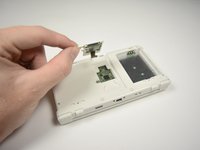
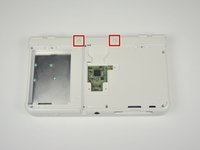
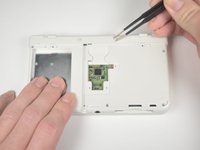
    • Reorient the device so that the game slot now faces you.

    • Remove the two rubber bumpers along the top of the device using tweezers.

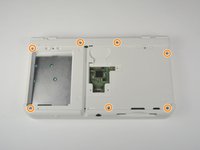
    • Unscrew the seven 6mm Phillips #00 screws along the top and bottom of the 3DS.

    Chiedi a FixBot
  8. Nintendo 3DS 2015 Touchscreen Assembly Replacement: passo 8, immagine 1 di 2 Nintendo 3DS 2015 Touchscreen Assembly Replacement: passo 8, immagine 2 di 2
    • Lift the top edge of the lower case slightly off on the 3DS.

    • Don't pull the lower casing completely off, you may break those connections. There are ribbon cables that must be disconnected first.

    • Pry the ribbon cable socket under the right trigger using a plastic opening tool.

    • Pry the ribbon cable socket under the infrared receiver cover using a plastic opening tool.

    Chiedi a FixBot
  9. Nintendo 3DS 2015 Touchscreen Assembly Replacement: passo 9, immagine 1 di 3 Nintendo 3DS 2015 Touchscreen Assembly Replacement: passo 9, immagine 2 di 3 Nintendo 3DS 2015 Touchscreen Assembly Replacement: passo 9, immagine 3 di 3
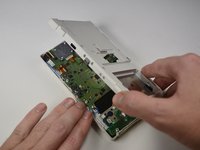
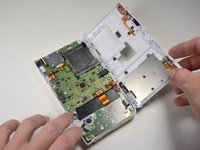
    • Open the device slowly from its top edge. Be careful not to tug the ribbon cable connected near the bottom edge of the device.

    • Pry the last ribbon cable attached to the lower case using a plastic opening tool.

    Chiedi a FixBot
  10. Nintendo 3DS 2015 Touchscreen Assembly Replacement, Circle Pad: passo 10, immagine 1 di 3 Nintendo 3DS 2015 Touchscreen Assembly Replacement, Circle Pad: passo 10, immagine 2 di 3 Nintendo 3DS 2015 Touchscreen Assembly Replacement, Circle Pad: passo 10, immagine 3 di 3
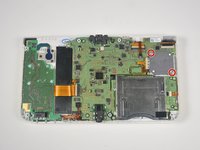
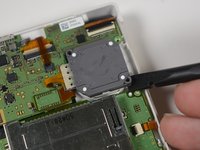
    • Locate the joystick assembly near the top right corner of the motherboard.

    • Remove the two 8mm Phillips #00 screws from the back of the joystick.

    • Use the flat end of the spudger to pry off the joystick pad from its plastic housing.

    Chiedi a FixBot
  11. Nintendo 3DS 2015 Touchscreen Assembly Replacement: passo 11, immagine 1 di 2 Nintendo 3DS 2015 Touchscreen Assembly Replacement: passo 11, immagine 2 di 2
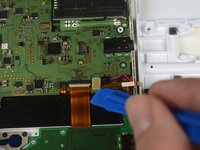
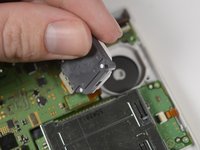
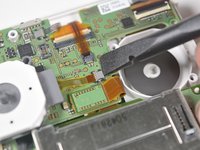
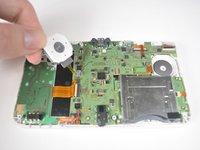
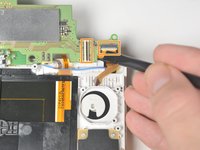
    • Lift the joystick pad and place it on its back. This will reveal the ribbon cable connected to the joystick pad.

    • Use the flat end of the spudger to pry up the retaining flap for the ribbon cable.

    • Lift the joystick out of the device.

    Chiedi a FixBot
  12. Nintendo 3DS 2015 Touchscreen Assembly Replacement, Gamecard Reader: passo 12, immagine 1 di 2 Nintendo 3DS 2015 Touchscreen Assembly Replacement, Gamecard Reader: passo 12, immagine 2 di 2
    • Locate the gamecard reader near the bottom right corner of the motherboard.

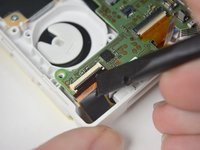
    • Unscrew the four 3mm Phillips #00 screws along the edge of the gamecard reader.

    • Lift the black latch on the ZIF connector along the right side of the reader using a plastic opening tool.

    Chiedi a FixBot
  13. Nintendo 3DS 2015 Touchscreen Assembly Replacement: passo 13, immagine 1 di 2 Nintendo 3DS 2015 Touchscreen Assembly Replacement: passo 13, immagine 2 di 2
    • Pry the ribbon cable from its socket, just left of the joystick, using the flat side of a spudger.

    • Grab the right edge of the gamecard reader and lift it out of the device, watching to make sure the ribbon cables don't snag.

    Chiedi a FixBot
  14. Nintendo 3DS 2015 Touchscreen Assembly Replacement, Motherboard: passo 14, immagine 1 di 3 Nintendo 3DS 2015 Touchscreen Assembly Replacement, Motherboard: passo 14, immagine 2 di 3 Nintendo 3DS 2015 Touchscreen Assembly Replacement, Motherboard: passo 14, immagine 3 di 3
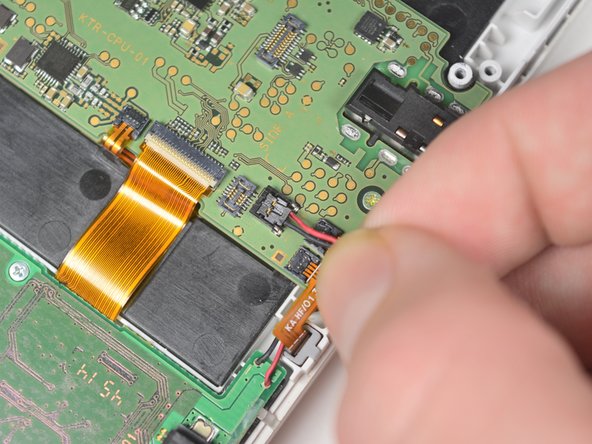
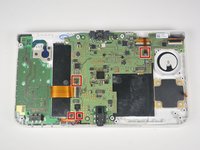
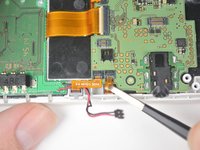
    • Remove the power cable, indicated by the black and red wires, by gently pulling it up and out of the connector.

    • Gently pull the ribbon cables out of the 4 ZIF connectors.

    • Do not lift up on the tabs on these ZIF connectors. Lifting these tabs will break the connectors.

    Chiedi a FixBot
  15. Nintendo 3DS 2015 Touchscreen Assembly Replacement: passo 15, immagine 1 di 2 Nintendo 3DS 2015 Touchscreen Assembly Replacement: passo 15, immagine 2 di 2
    Strumento utilizzato in questo passaggio:
    Tweezers
    $4.99
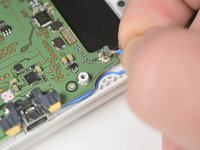
    • Pull up gently on the blue wifi antenna.

    • Pry the retaining tab on the connector behind the infrared receiver and gently pull the ribbon cable from the connector with tweezers.

    Chiedi a FixBot
  16. Nintendo 3DS 2015 Touchscreen Assembly Replacement: passo 16, immagine 1 di 3 Nintendo 3DS 2015 Touchscreen Assembly Replacement: passo 16, immagine 2 di 3 Nintendo 3DS 2015 Touchscreen Assembly Replacement: passo 16, immagine 3 di 3
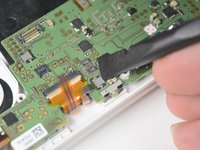
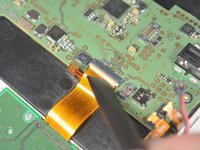
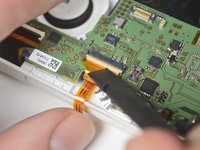
    • Lift the retaining tab and remove the large ribbon cable on the left side of the motherboard.

    • Lift the retaining tab and remove the large ribbon cable on the top of the motherboard behind the infrared receiver.

    • Lift the retaining tab and remove the large ribbon cable on the top of the motherboard just above the joysitck housing.

    Chiedi a FixBot
  17. Nintendo 3DS 2015 Touchscreen Assembly Replacement: passo 17, immagine 1 di 3 Nintendo 3DS 2015 Touchscreen Assembly Replacement: passo 17, immagine 2 di 3 Nintendo 3DS 2015 Touchscreen Assembly Replacement: passo 17, immagine 3 di 3
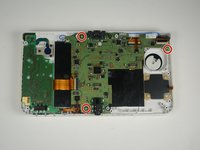
    • Double check that all motherboard connection on the top of the board have been disconnected.

    • Remove the three, 3mm Phillips #00 screws that secure the motherboard to the device housing.

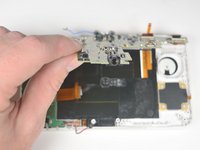
    • Lift the motherboard gently by the headphone jack.

    • Remove the two ribbons on the back of the device by lifting the retaining tabs on the ZIF connectors.

    Chiedi a FixBot
  18. Nintendo 3DS 2015 Touchscreen Assembly Replacement, Touchscreen Assembly: passo 18, immagine 1 di 2 Nintendo 3DS 2015 Touchscreen Assembly Replacement, Touchscreen Assembly: passo 18, immagine 2 di 2
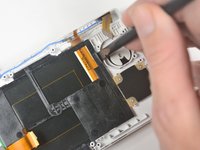
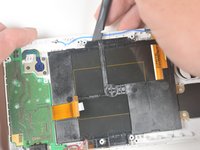
    • Pry the tab just left of the joystick housing until the right corner of the touchscreen is free.

    • Pry the top of the touchscreen gently until the top middle and left side of the touchscreen is free.

    Chiedi a FixBot
  19. Nintendo 3DS 2015 Touchscreen Assembly Replacement: passo 19, immagine 1 di 2 Nintendo 3DS 2015 Touchscreen Assembly Replacement: passo 19, immagine 2 di 2
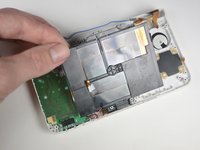
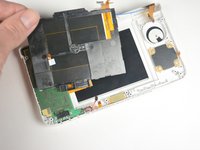
    • Gently pull up on the touchscreen from the left corner until the whole touchscreen is free.

    • Lift the touchscreen out of the device.

    Chiedi a FixBot
Conclusione

To reassemble your device, follow these instructions in reverse order.

Altre 5 persone hanno completato questa guida.

Tyler Starr

Membro da: 10/06/16

1.772 Reputazione

7 guide realizzate

Team

Cal Poly, Team 4-6, Livingston Fall 2016 Membro di Cal Poly, Team 4-6, Livingston Fall 2016

CPSU-LIVINGSTON-F16S4G6

4 Membri

45 guide realizzate

2Commenti sulla guida

so my new 3ds (normal size) bottom screen is pitch black (still is touch screen), if i do this procedure will it fix the problem? and if i watch a video of a new 3ds XL bottom screen being replaced would it be the same procedure as fixing a new 3ds normal size?

Dσƞυτ - Rispondi Condividi
I followed instructions but now the 3DS wont turn on, black screens with a blue light the turns off after about 20 - 30 seconds
i opened up again and saw 3 zif connectors were not closed flush, not sure if this is the problem. If it i how do you go about replacing them?

Bayley Inc - Rispondi Condividi

Aggiungi Commento

Visualizza statistiche:

Ultime 24 ore: 5

Ultimi 7 giorni: 94

Ultimi 30 giorni: 488

Tutti i Tempi: 16,329