Questa traduzione è stata generata automaticamente e non è stata ancora revisionata da una persona. Parli questa lingua? Dai un’occhiata.
Introduzione
Se il tuo schermo non risponde al tocco, è incrinato o sfarfalla, la sostituzione con uno schermo sostitutivo potrebbe risolvere questi problemi.
Cosa ti serve
-
-
-
Utilizzando un termocuscino o una pistola termica, riscalda i bordi dello schermo per ammorbidire la colla. Quest'area si estende per circa 2,5 cm dal bordo del dispositivo.
-
-
-
-
Utilizzando uno strumento di apertura in plastica e una ventosa secondo necessità per fare leva, inserisci delicatamente un bordo dello strumento di apertura sotto l'angolo dello schermo.
-
Fai scorrere lentamente lo strumento lungo tutto il bordo dello schermo.
-
-
-
Scollega i cavi arancioni che collegano lo schermo alla scheda madre tirando le piccole linguette. Usa lo spudger di nylon per sganciare questi cavi.
-
Lascia raffreddare la colla prima di farla entrare in contatto con qualsiasi altra superficie.
-


 Chiedi a FixBot


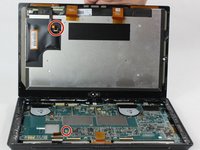
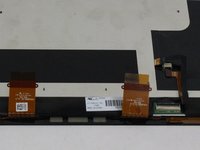
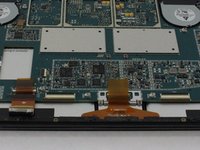
Per rimontare il dispositivo, segui queste istruzioni in ordine inverso.
Annulla: non ho completato questa guida.
Altre 6 persone hanno completato questa guida.

Team

USF Tampa, Team 6-2, Remmell Fall 2016 Membro di USF Tampa, Team 6-2, Remmell Fall 2016
USFT-REMMELL-F16S6G2
4 Membri
23 guide realizzate
6Commenti sulla guida
After replacing the screen my surface will turn on but the screen is just black.... in device manager its showing up as a 'Digital Flat Panel'
yet the screen is still black.. faulty replacement panel???
I did this procedure but i dont know why the display is not working it blink and then turnoff can somebody help me how to fix this problem
I purchased a screen replacement (LCD and Digitizer), but apparently, the flex from the motherboard to the screen (the small connector in red as well as the one on the lcd) are missing. Is there a way or place I can purchase just those flex? Or do I need to get a whole new motherboard?
Myne doesn't boot. The display is dack nothing happens. It's like it's not charging. What do I do. Thanks
