Questa traduzione è stata generata automaticamente e non è stata ancora revisionata da una persona. Parli questa lingua? Dai un’occhiata.
Introduzione
Ti verrà mostrato passo dopo passo come smontare il dispositivo fino a raggiungere la posizione della batteria. Da qui ti mostreremo come sostituire la batteria e poi come rimontare il dispositivo.
Cosa ti serve
-
-
-
Usa lo strumento di apertura in plastica per staccare lo schermo dalla cover posteriore.
 Chiedi a FixBot
-
-
-
-
Una volta separati il pannello posteriore e lo schermo come mostrato, inizia a sollevare la batteria, staccandola dai suoi cuscinetti adesivi.
-
-
-
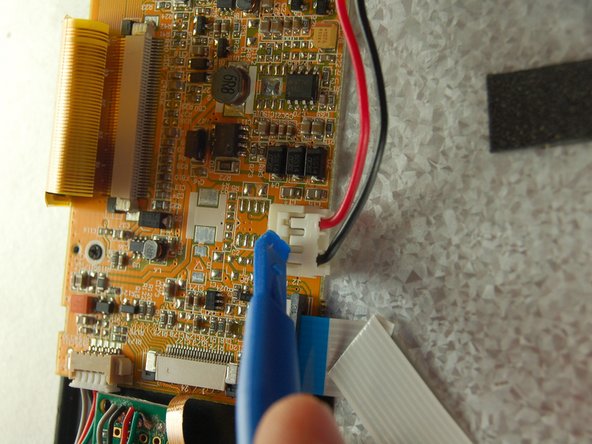
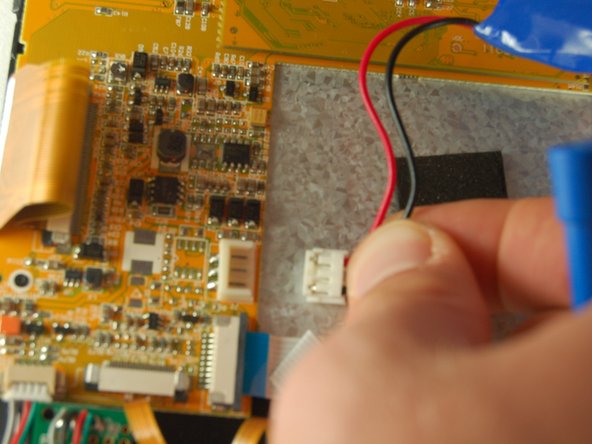
Scollega la batteria dalla presa indicata dallo strumento di apertura in plastica. (Il modo migliore per farlo è posizionare un dito su entrambi i lati della presa e tirare delicatamente verso l'esterno) Una volta rimossa la vecchia batteria, collega la nuova batteria alla stessa presa da cui proveniva quella vecchia.
-
-


Per rimontare il dispositivo, segui queste istruzioni in ordine inverso.

Team

Texas Tech, Team 38-1, Bennett Fall 2016 Membro di Texas Tech, Team 38-1, Bennett Fall 2016
TTU-BENNETT-F16S38G1
3 Membri
10 guide realizzate
