Salta al contenuto principale
Unisciti alla Community delle riparazioni - Crea un account

Logitech G603 Wheel Encoder Replacement

Cosa ti serve

    1. Logitech G603 Wheel Encoder Replacement, Remove Top Cover & Batteries: passo 1, immagine 1 di 1
      • Remove magnetic top cover, batteries, and wireless receiver (if currently stored inside the mouse)

      Chiedi a FixBot

      Aggiungi Commento

    2. Logitech G603 Wheel Encoder Replacement, Remove Mouse Feet: passo 2, immagine 1 di 3 Logitech G603 Wheel Encoder Replacement, Remove Mouse Feet: passo 2, immagine 2 di 3 Logitech G603 Wheel Encoder Replacement, Remove Mouse Feet: passo 2, immagine 3 di 3
      • Carefully remove the feet to reveal the 4 screws holding the top and bottom shells together

      • NOTE: These feet can be removed carefully enough to be reused. Only the top and bottom feet need to be removed, not the one around the sensor

      Chiedi a FixBot

      Aggiungi Commento

    3. Logitech G603 Wheel Encoder Replacement, Remove the four Phillips #00 Screws: passo 3, immagine 1 di 1
      • Use Phillips #00 to remove the four bottom screws

      Chiedi a FixBot

      Aggiungi Commento

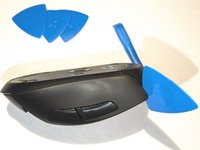
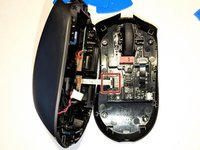
    4. Logitech G603 Wheel Encoder Replacement, Separate the Top and Bottom Shells: passo 4, immagine 1 di 3 Logitech G603 Wheel Encoder Replacement, Separate the Top and Bottom Shells: passo 4, immagine 2 di 3 Logitech G603 Wheel Encoder Replacement, Separate the Top and Bottom Shells: passo 4, immagine 3 di 3
      • Start at the top above the left and right click and slowly work your way around the shells until they are separated

      • Be careful not to damage the power connector or ribbon cable going from the top shell's boards/battery to the bottom shell's board

      Chiedi a FixBot

      Aggiungi Commento

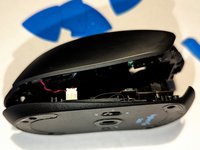
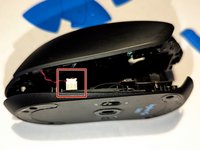
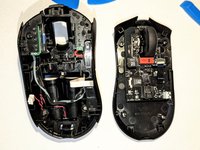
    5. Logitech G603 Wheel Encoder Replacement, Unplug Power and Ribbon Cables: passo 5, immagine 1 di 3 Logitech G603 Wheel Encoder Replacement, Unplug Power and Ribbon Cables: passo 5, immagine 2 di 3 Logitech G603 Wheel Encoder Replacement, Unplug Power and Ribbon Cables: passo 5, immagine 3 di 3
      • Start with the red and black power cable and gently pull it out

      • Once power cable is removed, you should be able to unfold the two halves and unplug the white ribbon cable

      Chiedi a FixBot

      Aggiungi Commento

    6. Logitech G603 Wheel Encoder Replacement, Remove Encoder Ribbon Cable: passo 6, immagine 1 di 1
      • Gently pull out the black ribbon cable connecting the encoder board to the main board

      Chiedi a FixBot

      Aggiungi Commento

    7. Logitech G603 Wheel Encoder Replacement, Remove 5 Phillips #00 Screws: passo 7, immagine 1 di 1
      • Remove the Phillips #00 screws holding the encoder board in place

      Chiedi a FixBot

      Aggiungi Commento

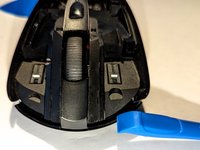
    8. Logitech G603 Wheel Encoder Replacement, Remove Encoder Board & Wheel: passo 8, immagine 1 di 1
      • Remove the encoder board from the bottom shell

      • Gently remove the wheel from the older encoder board

      • NOTE: The old wheel can be reused in the replacement encoder board

      Chiedi a FixBot

      Aggiungi Commento

Conclusione

To reassemble your device, follow these instructions in reverse order.

Annulla: non ho completato questa guida.

Un'altra persona ha completato questa guida.

Jim

Membro da: 06/17/23

331 Reputazione

2 guide realizzate

1Commento della guida

In my case, cleaning the encoder plate in an ultrasonic bath did the trick.

dobromir.dombek - Rispondi Condividi

Aggiungi Commento

Visualizza statistiche:

Ultime 24 ore: 5

Ultimi 7 giorni: 34

Ultimi 30 giorni: 201

Tutti i Tempi: 6,367