Salta al contenuto principale
Unisciti alla Community delle riparazioni - Crea un account

Logitech G502 Proteus Core Mouse Feet Replacement

Cosa ti serve

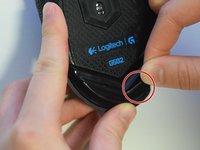
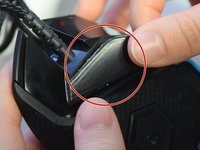
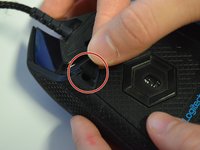
    1. Logitech G502 Proteus Core Mouse Feet Replacement, Mouse Feet: passo 1, immagine 1 di 3 Logitech G502 Proteus Core Mouse Feet Replacement, Mouse Feet: passo 1, immagine 2 di 3 Logitech G502 Proteus Core Mouse Feet Replacement, Mouse Feet: passo 1, immagine 3 di 3
      • Use your fingers or a nylon spudger to peel the old feet off all three corners where the screw holes are exposed.

      Chiedi a FixBot

      Aggiungi Commento

    2. Logitech G502 Proteus Core Mouse Feet Replacement: passo 2, immagine 1 di 3 Logitech G502 Proteus Core Mouse Feet Replacement: passo 2, immagine 2 di 3 Logitech G502 Proteus Core Mouse Feet Replacement: passo 2, immagine 3 di 3
      • Peel the backing off the new mouse feet to reveal the adhesive.

      Chiedi a FixBot

      Aggiungi Commento

    3. Logitech G502 Proteus Core Mouse Feet Replacement: passo 3, immagine 1 di 3 Logitech G502 Proteus Core Mouse Feet Replacement: passo 3, immagine 2 di 3 Logitech G502 Proteus Core Mouse Feet Replacement: passo 3, immagine 3 di 3
      • Apply the new mouse feet to their designated areas based on shape.

      Chiedi a FixBot

      Aggiungi Commento

    4. Logitech G502 Proteus Core Mouse Feet Replacement: passo 4, immagine 1 di 1
      • Apply even pressure across the mouse feet to ensure adherence.

      Chiedi a FixBot

      Aggiungi Commento

    5. Logitech G502 Proteus Core Mouse Feet Replacement: passo 5, immagine 1 di 1
      • Let adhesive sit for about 5-10 minutes with applied pressure.

      Chiedi a FixBot

      Aggiungi Commento

Conclusione

To reassemble your device, follow these instructions in reverse order.

Annulla: non ho completato questa guida.

Altre 4 persone hanno completato questa guida.

Team

UW Tacoma, Team S3-G1, Liner Spring 2017 Membro di UW Tacoma, Team S3-G1, Liner Spring 2017

UWT-LINER-S17S3G1

4 Membri

17 guide realizzate

1Commento della guida

You completely omitted half of the feet located on the mouse. The ones left out are the 3 located on the removable panel: there are 2 “v” shaped ones around the sensor and the one to the right of the “v” shapes.

Robert - Rispondi Condividi

Aggiungi Commento

Visualizza statistiche:

Ultime 24 ore: 2

Ultimi 7 giorni: 12

Ultimi 30 giorni: 57

Tutti i Tempi: 11,852