Questa traduzione è stata generata automaticamente e non è stata ancora revisionata da una persona. Parli questa lingua? Dai un’occhiata.
Introduzione
Questa guida spiega come sostituire la RAM nel portatile Lenovo Y50 Touch.
La RAM è essenzialmente la memoria a breve termine del tuo computer. Memorizza i dati temporanei di cui il processore ha bisogno per eseguire le applicazioni e aprire i file. La velocità del tuo portatile è determinata in parte dalla quantità di RAM di cui dispone. Aggiungere ulteriore RAM al portatile può migliorarne la velocità di elaborazione.
Prima di iniziare, assicurati di spegnere completamente il portatile e di scollegarlo da qualsiasi fonte di alimentazione esterna.
Cosa ti serve
-
-
-
Posiziona il portatile su una superficie piana con la cover posteriore rivolta verso l'alto.
-
Rimuovi tutte le dodici viti da 6 mm sul retro del portatile utilizzando un cacciavite a croce Phillips #1.
 Chiedi a FixBot
-
-
-
Rimuovi delicatamente la cover posteriore del laptop. Dovrebbe staccarsi facilmente.
-
-
-
-
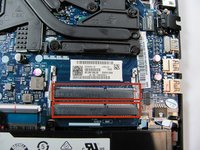
La RAM dovrebbe trovarsi nell'area indicata all'interno del portatile.
-
-
-
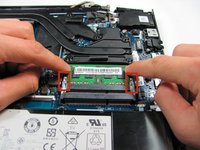
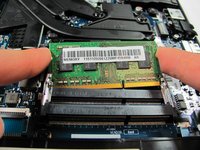
Rilascia le clip che fissano la RAM spingendo ciascuna clip lontano dalla RAM.
-
-
-
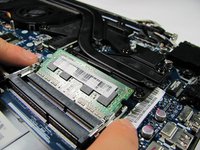
Scollega delicatamente la RAM dal suo alloggiamento.
-
Puoi sostituire fino a due stick di RAM per questo portatile. Ripeti semplicemente il passaggio 4 per il secondo alloggiamento della RAM.
-
Presta attenzione alla disposizione dei pin sulla RAM. Quando sostituisci la RAM, assicurati che i pin siano allineati con i pin sull'alloggiamento della RAM.
-
-




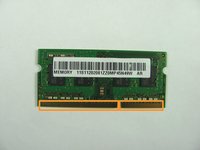
Per rimontare il dispositivo, segui queste istruzioni in ordine inverso.
Annulla: non ho completato questa guida.
Altre 9 persone hanno completato questa guida.

Team

Cal Poly, Team 18-1, Maness Winter 2015 Membro di Cal Poly, Team 18-1, Maness Winter 2015
CPSU-MANESS-W15S18G1
5 Membri
37 guide realizzate
