Salta al contenuto principale
Unisciti alla Community delle riparazioni - Crea un account

LG Tribute Touchscreen Replacement

Cosa ti serve

  1. LG Tribute Touchscreen Replacement, Battery: passo 1, immagine 1 di 2 LG Tribute Touchscreen Replacement, Battery: passo 1, immagine 2 di 2
    • Use the plastic opening tool to pry off the back cover.

    Chiedi a FixBot

    Aggiungi Commento

  2. LG Tribute Touchscreen Replacement: passo 2, immagine 1 di 1
    • Lift the battery out of place.

    • When replacing the battery, the (+) and (-) symbols must match up with the phone's charging nodes.

    Chiedi a FixBot

    Aggiungi Commento

  3. LG Tribute Touchscreen Replacement, Mid-panel: passo 3, immagine 1 di 2 LG Tribute Touchscreen Replacement, Mid-panel: passo 3, immagine 2 di 2
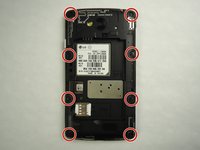
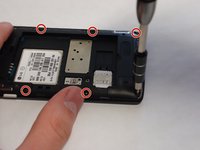
    • Remove eight 4mm screws using a Phillips head 000 screwdriver (PH000).

    Chiedi a FixBot

    Aggiungi Commento

  4. LG Tribute Touchscreen Replacement: passo 4, immagine 1 di 2 LG Tribute Touchscreen Replacement: passo 4, immagine 2 di 2
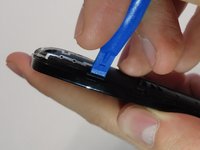
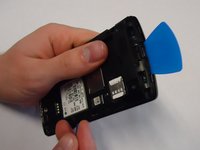
    • Use a plastic opening tool to loosen the tabs around the edge of the phone.

    • Inserting a thin piece of plastic will help prevent opened tabs from locking back into place.

    • This step can be frustrating, but requires patience. Avoid the temptation to pry the panel loose. Using excessive force may break the delicate tabs.

    Chiedi a FixBot

    Aggiungi Commento

  5. LG Tribute Touchscreen Replacement, Motherboard: passo 5, immagine 1 di 1
    • Use a plastic opening tool to disconnect the touchscreen from the motherboard.

    • The motherboard will be completely free from the front panel after this step.

    Chiedi a FixBot

    Aggiungi Commento

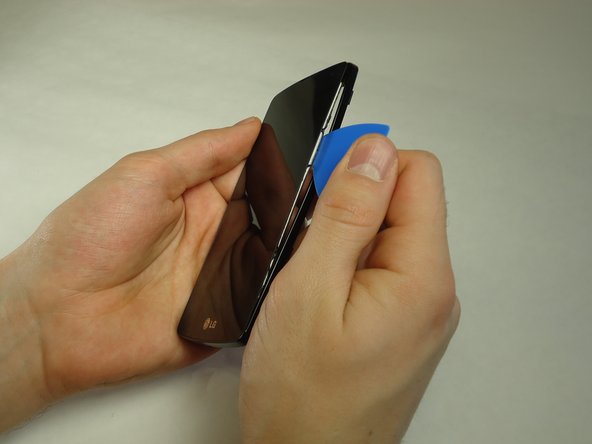
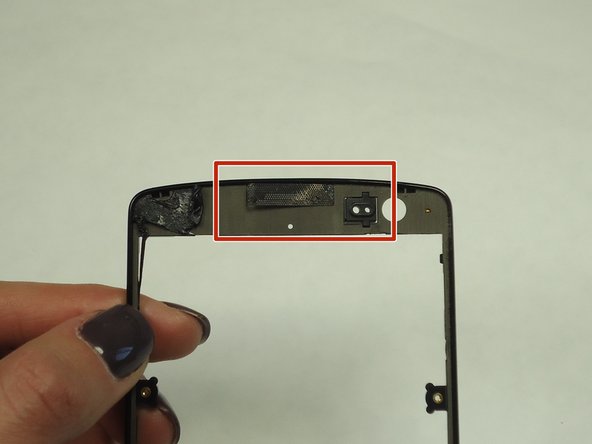
  6. LG Tribute Touchscreen Replacement, Touchscreen: passo 6, immagine 1 di 3 LG Tribute Touchscreen Replacement, Touchscreen: passo 6, immagine 2 di 3 LG Tribute Touchscreen Replacement, Touchscreen: passo 6, immagine 3 di 3
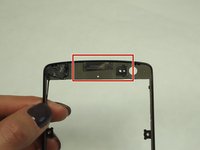
    • Use a thin piece of plastic to carefully peel the frame away from the touchscreen glass.

    • When the frame is completely free, remove all of the glue.

    • When removing the glue, be sure the speaker grill and LED light spacer do not dislodge.

    Chiedi a FixBot

    Aggiungi Commento

Conclusione

To reassemble your device, follow these instructions in reverse order.

Annulla: non ho completato questa guida.

Altre 12 persone hanno completato questa guida.

4Commenti sulla guida

thank you for all ypu work at web site

salah dholman - Rispondi Condividi

Can you peel away lens without taking apart ?

mikeknapik1 - Rispondi Condividi

Must I remove the motherboard to replace the front cover with the glass?

Deb Schell - Rispondi Condividi

I messed up the speaker is there a way to replace or fix it

bigestbabybratt - Rispondi Condividi

Aggiungi Commento

Visualizza statistiche:

Ultime 24 ore: 1

Ultimi 7 giorni: 4

Ultimi 30 giorni: 34

Tutti i Tempi: 16,520