Salta al contenuto principale
Unisciti alla Community delle riparazioni - Crea un account

LG Cosmos Side Case Replacement

Cosa ti serve

  1. LG Cosmos Side Case Replacement, Battery: passo 1, immagine 1 di 1
    • Apply an upward force to slide the back cover off.

    Chiedi a FixBot
  2. LG Cosmos Side Case Replacement: passo 2, immagine 1 di 1
    • Use your finger to push down on the top of the battery and pull it out.

    Chiedi a FixBot
  3. LG Cosmos Side Case Replacement, Rear Case: passo 3, immagine 1 di 1
    • Remove the five 3.0mm Phillips #000 screws along the edge of the rear case.

    Chiedi a FixBot
  4. LG Cosmos Side Case Replacement: passo 4, immagine 1 di 1
    • Use a plastic opening tool to pry the rear case loose.

    Chiedi a FixBot
  5. LG Cosmos Side Case Replacement: passo 5, immagine 1 di 1
    • Once the rear case is loose, lift it from the rest of the phone.

    Chiedi a FixBot
  6. LG Cosmos Side Case Replacement, Motherboard: passo 6, immagine 1 di 1
    • Remove the two 2.9 mm Phillips #000 screws that are slightly off-centered to the right.

    Chiedi a FixBot
  7. LG Cosmos Side Case Replacement: passo 7, immagine 1 di 1
    • Use the plastic opening tool to pry the motherboard loose.

    Chiedi a FixBot
  8. LG Cosmos Side Case Replacement: passo 8, immagine 1 di 1
    • Hold the motherboard from the top and bottom and slowly lift the motherboard until you feel a pull.

    • The flex cable is attached at the bottom of the motherboard and can be damaged if too much lifting force is applied.

    Chiedi a FixBot
  9. LG Cosmos Side Case Replacement: passo 9, immagine 1 di 1
    • Once the motherboard is lifted , rotate the motherboard up 90 degrees to the right.

    Chiedi a FixBot
  10. LG Cosmos Side Case Replacement: passo 10, immagine 1 di 1
    • Use your finger to pull the flex cable out from its connector.

    Chiedi a FixBot
  11. LG Cosmos Side Case Replacement: passo 11, immagine 1 di 1
    • Pull the motherboard away from the rest of the phone.

    Chiedi a FixBot
  12. LG Cosmos Side Case Replacement, Silicon Keypad: passo 12, immagine 1 di 1
    • Lift the silicon keypad away from the rest of the phone.

    Chiedi a FixBot
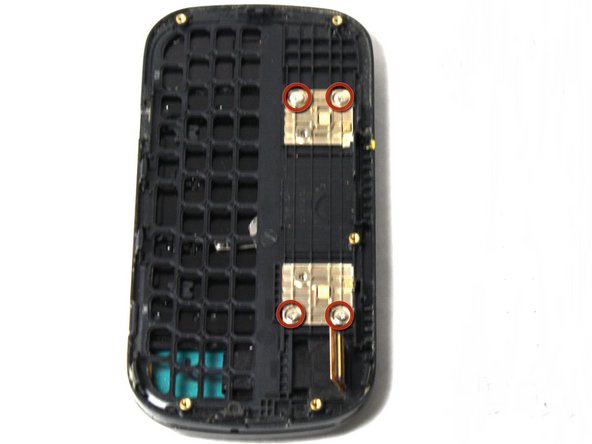
  13. LG Cosmos Side Case Replacement, Side Case: passo 13, immagine 1 di 1
    • Remove the four 2.0mm Phillips #000 screws on the golden squares.

    Chiedi a FixBot
  14. LG Cosmos Side Case Replacement: passo 14, immagine 1 di 1
    • Slowly lift the side case away from the rest of the phone.

    • The flex cable can be torn if it is caught on the frame of the side case.

    Chiedi a FixBot
Conclusione

To reassemble your device, follow these instructions in reverse order.

Team

Cal Poly, Team 13-63, Johann Spring 2013 Membro di Cal Poly, Team 13-63, Johann Spring 2013

CPSU-JOHANN-S13S13G63

3 Membri

14 guide realizzate

0Commenti sulla guida

Aggiungi Commento

Visualizza statistiche:

Ultime 24 ore: 2

Ultimi 7 giorni: 7

Ultimi 30 giorni: 52

Tutti i Tempi: 1,285