Salta al contenuto principale
Unisciti alla Community delle riparazioni - Crea un account

LG CU400 Battery Replacement

  1. LG CU400 Battery Replacement, Battery: passo 1, immagine 1 di 2 LG CU400 Battery Replacement, Battery: passo 1, immagine 2 di 2
    • Push the button labeled 'PUSH' on the rear cover.

    Chiedi a FixBot
  2. LG CU400 Battery Replacement: passo 2, immagine 1 di 3 LG CU400 Battery Replacement: passo 2, immagine 2 di 3 LG CU400 Battery Replacement: passo 2, immagine 3 di 3
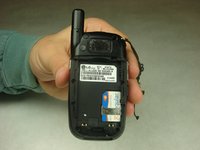
    • Slide the rear cover towards you.

    Chiedi a FixBot
  3. LG CU400 Battery Replacement: passo 3, immagine 1 di 2 LG CU400 Battery Replacement: passo 3, immagine 2 di 2
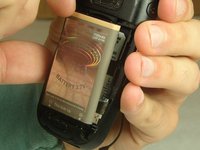
    • To remove the battery, grasp the top front edge of the battery and pull the battery away from the phone.

    • When installing the new battery, have the metal contacts of the phone match up with the metal contacts of the battery.

    Chiedi a FixBot
Conclusione

To reassemble your device, follow these instructions in reverse order.

Altre 2 persone hanno completato questa guida.

Team

IUPUI, Team 1-3, Harley Fall 2016 Membro di IUPUI, Team 1-3, Harley Fall 2016

IUPUI-HARLEY-F16S1G3

4 Membri

14 guide realizzate

0Commenti sulla guida

Aggiungi Commento

Visualizza statistiche:

Ultime 24 ore: 1

Ultimi 7 giorni: 6

Ultimi 30 giorni: 41

Tutti i Tempi: 406