Salta al contenuto principale
Unisciti alla Community delle riparazioni - Crea un account

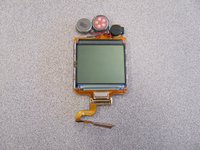
LG 1010 LCD Screen Replacement

Cosa ti serve

  1. LG 1010 LCD Screen Replacement, Battery: passo 1, immagine 1 di 1
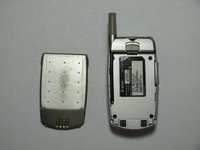
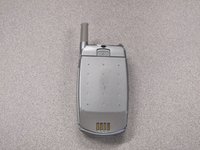
    • Turn off the cell phone and place face down on a flat surface.

    Chiedi a FixBot
  2. LG 1010 LCD Screen Replacement: passo 2, immagine 1 di 2 LG 1010 LCD Screen Replacement: passo 2, immagine 2 di 2
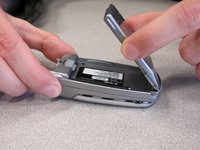
    • While sliding the gray tab up, lift battery up and away from the cell phone.

    Chiedi a FixBot
  3. LG 1010 LCD Screen Replacement: passo 3, immagine 1 di 3 LG 1010 LCD Screen Replacement: passo 3, immagine 2 di 3 LG 1010 LCD Screen Replacement: passo 3, immagine 3 di 3
    • Remove battery and set aside.

    Chiedi a FixBot
  4. LG 1010 LCD Screen Replacement, Front  Cover: passo 4, immagine 1 di 2 LG 1010 LCD Screen Replacement, Front  Cover: passo 4, immagine 2 di 2
    • Use a Spudger to remove the two front plastic covers to reveal screws.

    Chiedi a FixBot
  5. LG 1010 LCD Screen Replacement: passo 5, immagine 1 di 1
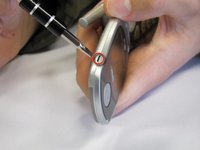
    • Remove two screws using a Torx T6 screwdriver.

    Chiedi a FixBot
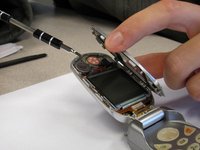
  6. LG 1010 LCD Screen Replacement: passo 6, immagine 1 di 2 LG 1010 LCD Screen Replacement: passo 6, immagine 2 di 2
    • Pry off the screen front cover with a small flathead screwdriver.

    Chiedi a FixBot
  7. LG 1010 LCD Screen Replacement: passo 7, immagine 1 di 1
    • Insert a small flathead screwdriver into the hinge and separate hinge connection.

    Chiedi a FixBot
  8. LG 1010 LCD Screen Replacement: passo 8, immagine 1 di 1
    • Pry off the speaker which is glued on to the front cover using a small flathead screwdriver.

    Chiedi a FixBot
  9. LG 1010 LCD Screen Replacement: passo 9, immagine 1 di 1
    • Remove remaining portion of the front case from the flexible circuit board.

    • Do not attempt to remove the LCD board at this time, as it is attached to the rear panel assembly.

    Chiedi a FixBot
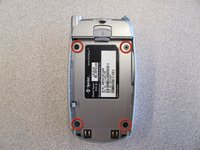
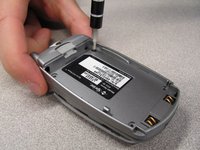
  10. LG 1010 LCD Screen Replacement, Back Cover: passo 10, immagine 1 di 2 LG 1010 LCD Screen Replacement, Back Cover: passo 10, immagine 2 di 2
    • Unscrew the four screws on the back case using a T6 Torx Screwdriver.

    Chiedi a FixBot
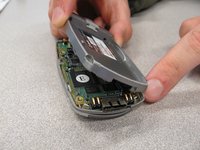
  11. LG 1010 LCD Screen Replacement: passo 11, immagine 1 di 2 LG 1010 LCD Screen Replacement: passo 11, immagine 2 di 2
    • Pull the back cover straight off the phone using your thumb and forefinger.

    Chiedi a FixBot
  12. LG 1010 LCD Screen Replacement, Keypad: passo 12, immagine 1 di 1
    • Pry off circuit board with a flathead screwdriver.

    Chiedi a FixBot
  13. LG 1010 LCD Screen Replacement: passo 13, immagine 1 di 1
    • Pull out flexible keypad.

    Chiedi a FixBot
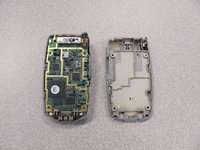
  14. LG 1010 LCD Screen Replacement, LCD Screen: passo 14, immagine 1 di 1
    • The phone should now look like the picture to the left.

    Chiedi a FixBot
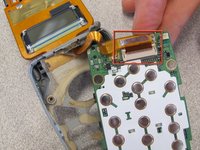
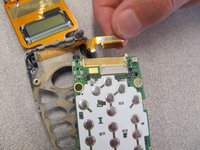
  15. LG 1010 LCD Screen Replacement: passo 15, immagine 1 di 2 LG 1010 LCD Screen Replacement: passo 15, immagine 2 di 2
    • Locate and detach the ribbon cable from circuit board.

    Chiedi a FixBot
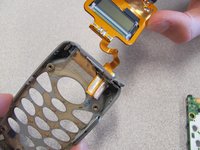
  16. LG 1010 LCD Screen Replacement: passo 16, immagine 1 di 2 LG 1010 LCD Screen Replacement: passo 16, immagine 2 di 2
    • Remove the LCD Screen from the phone case and replace with a new LCD screen.

    Chiedi a FixBot
Conclusione

To reassemble your device, follow these instructions in reverse order.

Altre 2 persone hanno completato questa guida.

Team

Cal Poly, Team 3-25, Regan Fall 2010 Membro di Cal Poly, Team 3-25, Regan Fall 2010

CPSU-REGAN-F10S3G25

4 Membri

14 guide realizzate

0Commenti sulla guida

Aggiungi Commento

Visualizza statistiche:

Ultime 24 ore: 0

Ultimi 7 giorni: 9

Ultimi 30 giorni: 88

Tutti i Tempi: 1,307