Questa traduzione è stata generata automaticamente e non è stata ancora revisionata da una persona. Parli questa lingua? Dai un’occhiata.
Introduzione
Per sostituire la batteria di questo dispositivo sono necessarie competenze di saldatura. Consulta la guida Competenze di saldatura di iFixit per ricevere ulteriore aiuto.
Cosa ti serve
-
-
-
Rimuovi le 4 viti esterne usando un cacciavite a croce Phillips #000.
 Chiedi a FixBot
-
-
-
Fai leva per rimuovere la cover posteriore usando gli strumenti di apertura iFixit blu. Fallo scorrere lungo la giuntura finché non riesci a infilare le dita sotto per separarli.
-
-
-
-
-
-
Rimuovi il nastro adesivo giallo dai lati della batteria e dai componenti circostanti.
-
-
-
Taglia i cavi positivo (+) e negativo (-) che collegano la batteria al dispositivo usando delle tronchesine.
-
-
-
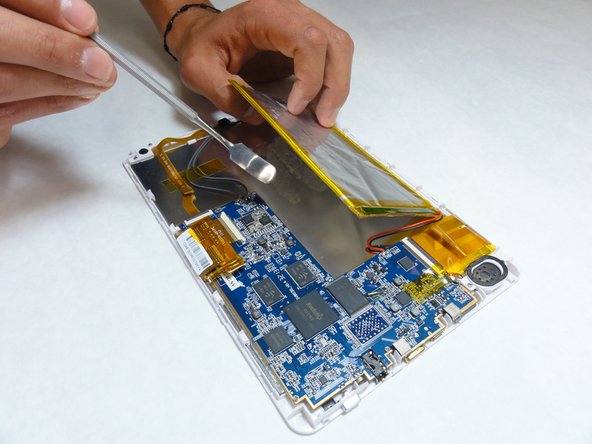
Usando uno strumento di apertura in plastica o uno spudger, solleva lentamente la batteria dalla scheda.
-
-
-
Usa un adesivo biadesivo per fissare la nuova batteria in posizione.
-
Salda o crimpa i cavi per ricollegarli alla scheda madre.
-
Sostituisci il nastro giallo rimosso all'inizio per fissare nuovamente i cavi in posizione.
-
-



Per rimontare il dispositivo, segui queste istruzioni in ordine inverso.

Team

IUPUI, Team 1-3, Baechle Fall 2015 Membro di IUPUI, Team 1-3, Baechle Fall 2015
IUPUI-BAECHLE-F15S1G3
5 Membri
32 guide realizzate
1Commento della guida
Very good instructions.....but where do I buy the repkacement battery from?
