Introduzione
This guide will assist with replacing a non-functioning projector lamp, which is responsible for providing the light necessary for projection.
Cosa ti serve
-
-
-
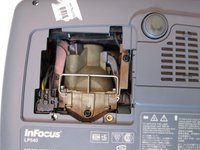
Place the projector on its back with the control buttons facing down.
-
Remove the black 7mm screw on the external case with a Phillips 2 screwdriver.
 Chiedi a FixBot
-
-
-
-
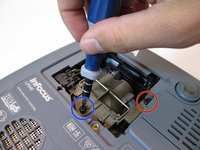
Remove the 7mm screw near the bottom center with a Philips 2 screwdriver head.
-
Loosen but do not remove the 7mm screw near the upper right corner with the Phillips 2 screwdriver head.
-
-
-
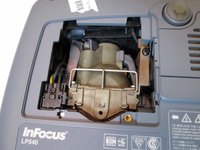
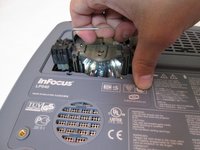
Grab the silver handle.
-
Unhook the handle so it can move freely.
-
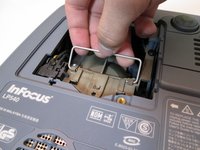
Pull the handle straight up until the lamp is completely removed from projector.
-
-




To reassemble your device, follow these instructions in reverse order.
Annulla: non ho completato questa guida.
Un'altra persona ha completato questa guida.

Team

Cal Poly, Team 13-17, Regan Winter 2014 Membro di Cal Poly, Team 13-17, Regan Winter 2014
CPSU-REGAN-W14S13G17
6 Membri
15 guide realizzate
