Questa traduzione è stata generata automaticamente e non è stata ancora revisionata da una persona. Parli questa lingua? Dai un’occhiata.
Introduzione
Questa guida mostra come rimuovere un touchpad difettoso dal poggia-polsi di un IBM Thinkpad T60. Ricordati di spegnere sempre il computer prima di tentare l'installazione o la rimozione di qualsiasi componente hardware. Assicurati di scollegare l'alimentatore e tutti i cavi dal computer. Se il computer è rimasto acceso, attendi alcuni minuti prima di iniziare la procedura per assicurarti che tutti i componenti si siano raffreddati.
Cosa ti serve
-
-
-
Capovolgi il computer per individuare la piccola linguetta sulla batteria, situata vicino alla parte superiore del ThinkPad.
-
Usa il dito per far scorrere la linguetta verso destra per sbloccare la batteria.
 Chiedi a FixBot
-
-
-
Una volta che la linguetta è in posizione di sblocco (tutta a destra), tira la batteria verso l'esterno, lontano dal Thinkpad.
-
La batteria è ora scollegata.
-
-
-
-
-
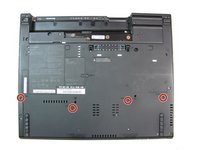
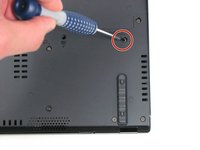
Utilizzando un cacciavite a croce Phillips n. 0, rimuovi le quattro viti da 17,0 mm.
-
-
-
Capovolgi nuovamente il computer, in modo che la tastiera sia rivolta verso l'alto.
-
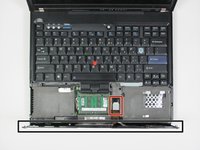
Apri il display per accedere al poggiapolsi. Esercita una pressione sui lati del poggiapolsi in modo che si pieghi verso l'alto al centro. Sollevalo delicatamente dal computer.
-
-
-
-
Solleva leggermente il poggia polsi allontanandolo dal computer.
-
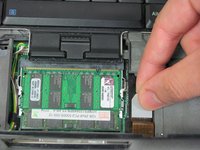
Scollega il connettore tirando verso l'alto la linguetta bianca.
-
-
-
-
-
Capovolgi il poggiapolsi per accedere al retro del touchpad.
-
-
-
Usando le dita, rimuovi la pellicola di plastica che funge da copertura per i due connettori del touchpad.
-
-
Strumento utilizzato in questo passaggio:Tweezers$4.99
-
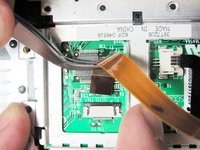
Individua il connettore con i cavi neri.
-
Per sganciare il connettore, usa le pinzette per tirare verso l'esterno le due linguette grigie.
-
Una volta sganciate le linguette grigie, usa le pinzette per tirare i cavi neri e il connettore si staccherà dalla porta.
-
-
-
Individua il connettore con i cavi arancioni.
-
Per sganciare il connettore, usa le pinzette per tirare il cavo arancione verso l'esterno.
-
-
-
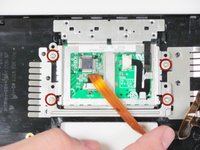
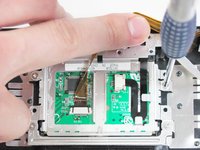
Usa un cacciavite a croce Phillips #0 per svitare le quattro viti a croce Phillips da 3,4 mm cerchiate in rosso.
-
-
-
Usando le dita, rimuovi il telaio metallico attorno al touch pad tirando verso l'alto ciascuno dei quattro angoli.
-
-






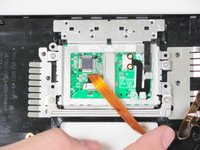
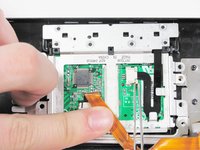
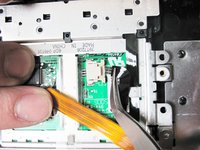


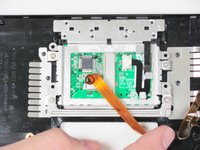




Per rimontare il dispositivo, segui queste istruzioni in ordine inverso.
Annulla: non ho completato questa guida.
Un'altra persona ha completato questa guida.

Team

Cal Poly, Team 7-9, Maness Winter 2013 Membro di Cal Poly, Team 7-9, Maness Winter 2013
CPSU-MANESS-W13S7G9
4 Membri
56 guide realizzate
2Commenti sulla guida
I bought mine used on eBay. and upgraded the HDD and RAM and it is working perfectly. But I recently noticed that the palm rest is not perfectly seated at the front edge and is raised by roughly 2mm. (⅛in.) I have tried refitting the palm rest, but it hasn’t made any different. It is possible that it was like that before I fitted the RAM and I just hadn’t notice, so it could be the result of an earlier intervention. The machine still works OK and the lid closes, so it isn’t a big deal, but it is a bit annoying that such a well engineered device doesn’t go back together exactly as it should. Any suggestions?
Sort of solved it . . . . . Get the left hand side located first and jiggle it about a bit and the palm rest will fit back neatly. But it isn’t immediately obvious how you shouls go about this.
