Salta al contenuto principale
Unisciti alla Community delle riparazioni - Crea un account

IBM ThinkPad A30 RAM Replacement

Cosa ti serve

  1. IBM ThinkPad A30 RAM Replacement, Battery: passo 1, immagine 1 di 2 IBM ThinkPad A30 RAM Replacement, Battery: passo 1, immagine 2 di 2
    • Flip the ThinkPad over so that it is upside down.

    • Slide the highlighted tab to the left.

    • With your finger on the tab, remove the battery by lifting it upwards away from the laptop.

    Chiedi a FixBot

    Aggiungi Commento

  2. IBM ThinkPad A30 RAM Replacement, RAM: passo 2, immagine 1 di 2 IBM ThinkPad A30 RAM Replacement, RAM: passo 2, immagine 2 di 2
    • Remove the two 5.3mm cover screws.

    • Gently lift the cover containing the RAM.

    Chiedi a FixBot

    Aggiungi Commento

  3. IBM ThinkPad A30 RAM Replacement: passo 3, immagine 1 di 1
    • Remove RAM module by pressing the two metal pieces outward with your thumbs.

    Chiedi a FixBot

    Aggiungi Commento

  4. IBM ThinkPad A30 RAM Replacement: passo 4, immagine 1 di 2 IBM ThinkPad A30 RAM Replacement: passo 4, immagine 2 di 2
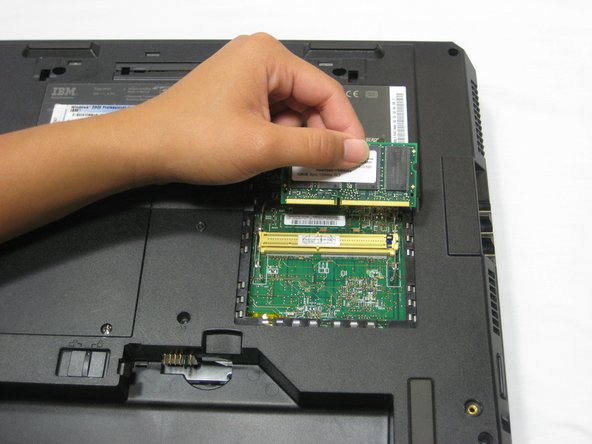
    • Lift the RAM module up and out, away from the yellow connector.

    • Place the RAM module away from any magnets or static electricity prone areas.

    Chiedi a FixBot

    Aggiungi Commento

Conclusione

To reassemble your device, follow these instructions in reverse order.

Annulla: non ho completato questa guida.

Un'altra persona ha completato questa guida.

Jessica

Membro da: 10/06/10

162 Reputazione

7 guide realizzate

Team

Cal Poly, Team 4-44, Amido Fall 2010 Membro di Cal Poly, Team 4-44, Amido Fall 2010

CPSU-AMIDO-F10S4G44

4 Membri

26 guide realizzate

0Commenti sulla guida

Aggiungi Commento

Visualizza statistiche:

Ultime 24 ore: 0

Ultimi 7 giorni: 10

Ultimi 30 giorni: 86

Tutti i Tempi: 3,512