Introduzione
If you need to access the internals of your Hover-1, or want to replace the case, use this guide. It will show you how to remove the case. You will need a Phillips #2 screwdriver.
Cosa ti serve
-
-
-
Flip the Hover-1 Chrome upside down.
-
Use a Phillips #2 screwdriver to remove the fourteen 14 mm screws from the bottom of the Hover-1.
-
Break the two black tape circles, and remove the two 15 mm Phillips screws underneath.
 Chiedi a FixBot
-
-
-
-
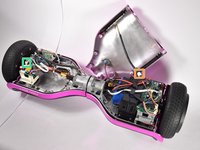
Lift the shell with the speaker grille.
-
Unplug the speaker.
-
Unplug the LEDs.
-
Unplug the power button
-
Unplug the charging port.
-
-


To reassemble your device, follow these instructions in reverse order.

Team

Cal Poly, Team S4-G1, White Fall 2018 Membro di Cal Poly, Team S4-G1, White Fall 2018
CPSU-WHITE-F18S4G1
4 Membri
6 guide realizzate
