Introduzione
The button can get stuck or break completely. This guide will show how to remove the button from the printer.
Cosa ti serve
-
-
-
Locate the power button on the bottom left side of the device.
-
Wedge the opening tool into the small gap between the power button panel and printer.
-
Apply pressure on the opening tool and open the power button panel.
-
Gently remove the power button panel assembly from the printer to access the power button.
 Chiedi a FixBot
-
-
-
-
Press on the power button from the front of the panel to release it.
-
-
-
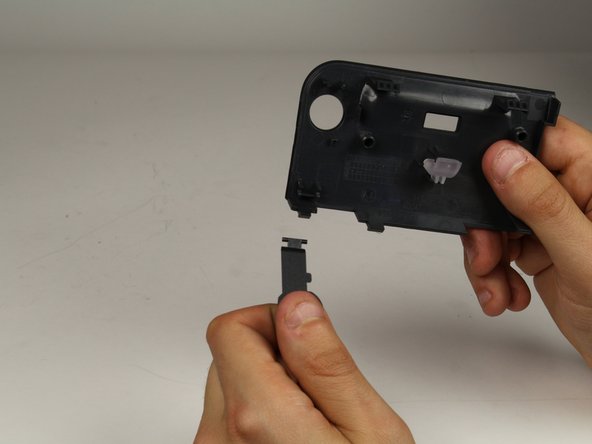
Turn the panel around so you are viewing the back of it.
-
Disconnect the power button from the panel by gently pulling the button out (toward your body).
-
-


To reassemble your device, follow these instructions in reverse order.

Team

Cal Poly, Team S19-G2, Livingston Spring 2018 Membro di Cal Poly, Team S19-G2, Livingston Spring 2018
CPSU-LIVINGSTON-S18S19G2
Membro di 1
6 guide realizzate
