Salta al contenuto principale
Unisciti alla Community delle riparazioni - Crea un account

HP Compaq NC6120 Monitor Replacement

Cosa ti serve

    1. HP Compaq NC6120 Monitor Replacement, Monitor: passo 1, immagine 1 di 2 HP Compaq NC6120 Monitor Replacement, Monitor: passo 1, immagine 2 di 2
      • Locate and remove four black 5.1mm Phillips #1 screws from the left and right sides of the monitor.

      Chiedi a FixBot

      Aggiungi Commento

    2. HP Compaq NC6120 Monitor Replacement: passo 2, immagine 1 di 3 HP Compaq NC6120 Monitor Replacement: passo 2, immagine 2 di 3 HP Compaq NC6120 Monitor Replacement: passo 2, immagine 3 di 3
      • Using a small spudger, remove the four black plastic covers from above the monitor, revealing screws underneath.

      Chiedi a FixBot

      Aggiungi Commento

    3. HP Compaq NC6120 Monitor Replacement: passo 3, immagine 1 di 1
      • Remove the four screws that were just uncovered. They are 6.2mm 3.0 flathead screws.

      Chiedi a FixBot

      Aggiungi Commento

    4. HP Compaq NC6120 Monitor Replacement: passo 4, immagine 1 di 1
      • Pry off the plastic case surrounding the monitor.

      • A spudger may be needed to pry off the case.

      Chiedi a FixBot

      Aggiungi Commento

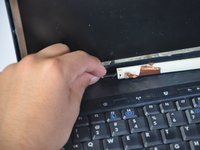
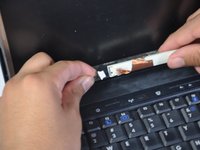
    5. HP Compaq NC6120 Monitor Replacement: passo 5, immagine 1 di 3 HP Compaq NC6120 Monitor Replacement: passo 5, immagine 2 di 3 HP Compaq NC6120 Monitor Replacement: passo 5, immagine 3 di 3
      • Remove the black and silver cable, located directly below the monitor.

      • Proceed to pull monitor approximately 10cm away from the back of the laptop case.

      Chiedi a FixBot

      Aggiungi Commento

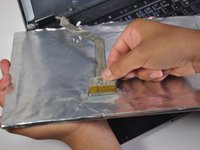
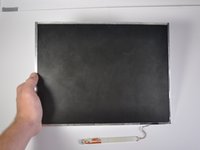
    6. HP Compaq NC6120 Monitor Replacement: passo 6, immagine 1 di 2 HP Compaq NC6120 Monitor Replacement: passo 6, immagine 2 di 2
      • Remove the grey cable (with yellow tip) connecting the monitor to the back plastic casing and the monitor will be free from the rest of the laptop.

      Chiedi a FixBot

      Aggiungi Commento

Conclusione

To reassemble your device, follow these instructions in reverse order.

Annulla: non ho completato questa guida.

Un'altra persona ha completato questa guida.

Team

Cal Poly, Team 17-4, Forte Spring 2015 Membro di Cal Poly, Team 17-4, Forte Spring 2015

CPSU-FORTE-S15S17G4

3 Membri

18 guide realizzate

0Commenti sulla guida

Aggiungi Commento

Visualizza statistiche:

Ultime 24 ore: 0

Ultimi 7 giorni: 4

Ultimi 30 giorni: 15

Tutti i Tempi: 1,796