Salta al contenuto principale
Unisciti alla Community delle riparazioni - Crea un account

HP Compaq C700 Touchpad Replacement

Cosa ti serve

  1. HP Compaq C700 Touchpad Replacement, Keyboard: passo 1, immagine 1 di 1
    • It is advised to work on the device only when it is powered off so as to avoid electrocution risks.

    • Turn off computer by pressing and holding the power button.

    Chiedi a FixBot
  2. HP Compaq C700 Touchpad Replacement: passo 2, immagine 1 di 3 HP Compaq C700 Touchpad Replacement: passo 2, immagine 2 di 3 HP Compaq C700 Touchpad Replacement: passo 2, immagine 3 di 3
    • Locate and unscrew the two screws on the back marked with a small keyboard. These screws hold the keyboard in place.

    • Locate the metal hooks where the keyboard connects to the laptop and use a metal spudger to gently pry up the keyboard.

    Chiedi a FixBot
  3. HP Compaq C700 Touchpad Replacement: passo 3, immagine 1 di 1
    • Gently lift up and remove the keyboard.

    Chiedi a FixBot
  4. HP Compaq C700 Touchpad Replacement, Touchpad: passo 4, immagine 1 di 1
    • Locate the twenty 3 mm Phillips head screws.

    • Unscrew them using the PH0 screwdriver.

    Chiedi a FixBot
  5. HP Compaq C700 Touchpad Replacement: passo 5, immagine 1 di 1
    • Remove the hard drive by pulling on the plastic tab and lifting upward.

    Chiedi a FixBot
  6. HP Compaq C700 Touchpad Replacement: passo 6, immagine 1 di 1
    • Locate and unscrew the two Phillips head 3 mm screws on the wireless card.

    Chiedi a FixBot
  7. HP Compaq C700 Touchpad Replacement: passo 7, immagine 1 di 1
    • Unhook the two wires connecting to the wireless card by gently pulling them out.

    Chiedi a FixBot
  8. HP Compaq C700 Touchpad Replacement: passo 8, immagine 1 di 1
    • Gently lift and pull out the card.

    Chiedi a FixBot
  9. HP Compaq C700 Touchpad Replacement: passo 9, immagine 1 di 1
    Strumento utilizzato in questo passaggio:
    Tweezers
    $4.99
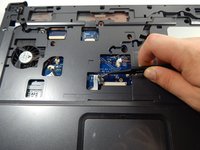
    • Locate the power button connector wire.

    • Using the tweezers, unhook the wire.

    Chiedi a FixBot
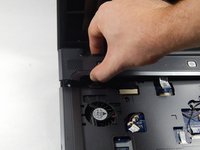
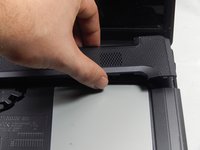
  10. HP Compaq C700 Touchpad Replacement: passo 10, immagine 1 di 2 HP Compaq C700 Touchpad Replacement: passo 10, immagine 2 di 2
    • Press and hold the lock to pop the panel piece above the keyboard and pull up to remove it.

    Chiedi a FixBot
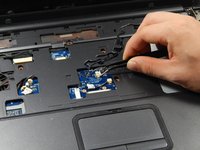
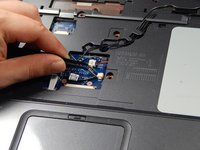
  11. HP Compaq C700 Touchpad Replacement: passo 11, immagine 1 di 3 HP Compaq C700 Touchpad Replacement: passo 11, immagine 2 di 3 HP Compaq C700 Touchpad Replacement: passo 11, immagine 3 di 3
    • Unplug the remaining wires using the tweezers.

    Chiedi a FixBot
  12. HP Compaq C700 Touchpad Replacement: passo 12, immagine 1 di 1
    • Gently pull out the three wires.

    Chiedi a FixBot
  13. HP Compaq C700 Touchpad Replacement: passo 13, immagine 1 di 2 HP Compaq C700 Touchpad Replacement: passo 13, immagine 2 di 2
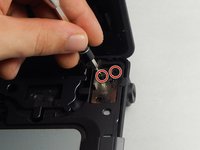
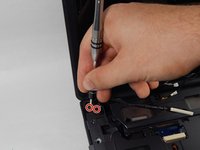
    • Locate the four 3 mm Phillips head screws.

    • Unscrew them using the PH0 screwdriver.

    Chiedi a FixBot
  14. HP Compaq C700 Touchpad Replacement: passo 14, immagine 1 di 1
    • Unhook the display connector wire.

    Chiedi a FixBot
  15. HP Compaq C700 Touchpad Replacement: passo 15, immagine 1 di 1
    • Gently disconnect the display by pulling it upwards.

    Chiedi a FixBot
  16. HP Compaq C700 Touchpad Replacement: passo 16, immagine 1 di 1
    • Locate the disk drive on the side of the device.

    • Remove it by pulling it all the way out.

    Chiedi a FixBot
  17. HP Compaq C700 Touchpad Replacement: passo 17, immagine 1 di 1
    • Use the PH0 screwdriver to remove the two 3 mm Phillips head screws in the disk drive port.

    Chiedi a FixBot
  18. HP Compaq C700 Touchpad Replacement: passo 18, immagine 1 di 1
    • Disconnect the touchpad connection using the tweezers.

    Chiedi a FixBot
  19. HP Compaq C700 Touchpad Replacement: passo 19, immagine 1 di 1
    • Use the plastic opening tool to pry up all sides of the device cover.

    Chiedi a FixBot
  20. HP Compaq C700 Touchpad Replacement: passo 20, immagine 1 di 1
    • Remove the cover by lifting it.

    Chiedi a FixBot
  21. HP Compaq C700 Touchpad Replacement: passo 21, immagine 1 di 1
    • Use the PH0 screwdriver to remove the six 1 mm Phillips head screws surrounding the touchpad

    Chiedi a FixBot
  22. HP Compaq C700 Touchpad Replacement: passo 22, immagine 1 di 1
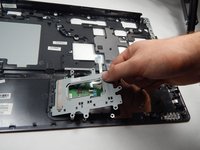
    • Use the tweezers to remove the touchpad wire connection.

    Chiedi a FixBot
  23. HP Compaq C700 Touchpad Replacement: passo 23, immagine 1 di 2 HP Compaq C700 Touchpad Replacement: passo 23, immagine 2 di 2
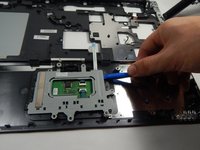
    • Use the plastic opening tool to pry up the touchpad cover.

    • Lift and remove the touchpad cover.

    Chiedi a FixBot
  24. HP Compaq C700 Touchpad Replacement: passo 24, immagine 1 di 1
    • Use the blow dryer to melt the adhesive around the edge of the touchpad.

    • The touchpad is now free to be removed.

    Chiedi a FixBot
Conclusione

To reassemble your device, follow these instructions in reverse order.

Altre 2 persone hanno completato questa guida.

Team

UMass Dartmouth, Team 5-6, Martin Fall 2016 Membro di UMass Dartmouth, Team 5-6, Martin Fall 2016

UMASSD-MARTIN-F16S5G6

3 Membri

6 guide realizzate

1Commento della guida

I need Compaq laptop c700 Touch pad

So how can I get it?

Suraj Verma - Rispondi Condividi

Aggiungi Commento

Visualizza statistiche:

Ultime 24 ore: 1

Ultimi 7 giorni: 3

Ultimi 30 giorni: 25

Tutti i Tempi: 1,657