Salta al contenuto principale
Unisciti alla Community delle riparazioni - Crea un account

GoPro Hero5 Black Back Housing Replacement

Cosa ti serve

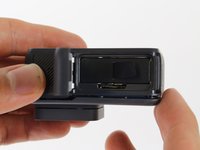
    1. GoPro Hero5 Black Back Housing Replacement, Battery: passo 1, immagine 1 di 3 GoPro Hero5 Black Back Housing Replacement, Battery: passo 1, immagine 2 di 3 GoPro Hero5 Black Back Housing Replacement, Battery: passo 1, immagine 3 di 3
      • While pressing the button on the bottom of the GoPro, slide the battery door to the side to pop it open.

      Chiedi a FixBot

      Aggiungi Commento

    2. GoPro Hero5 Black Back Housing Replacement: passo 2, immagine 1 di 3 GoPro Hero5 Black Back Housing Replacement: passo 2, immagine 2 di 3 GoPro Hero5 Black Back Housing Replacement: passo 2, immagine 3 di 3
      • Grab the plastic flap on the battery and pull the battery out.

      Chiedi a FixBot

      Aggiungi Commento

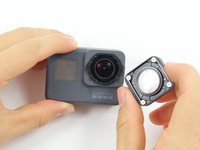
    1. GoPro Hero5 Black Back Housing Replacement, Back Housing: passo 3, immagine 1 di 2 GoPro Hero5 Black Back Housing Replacement, Back Housing: passo 3, immagine 2 di 2
      • Pull and twist the lens cover right or left until it pops off.

      • The lens cover is secured tightly and might be difficult to twist off.

      Chiedi a FixBot

      Aggiungi Commento

    2. GoPro Hero5 Black Back Housing Replacement: passo 4, immagine 1 di 1
      • This step is not necessary but will make the process of removing the faceplate much easier.

      • Refer to the iOpener instructions for how to heat up and use the iOpener.

      • Apply the heated iOpener to the front of the GoPro for a few minutes to melt the adhesive under the faceplate.

      • The heated iOpener is very hot and can burn your hands. Avoid burns by using towels or gloves to hold the iOpener.

      Chiedi a FixBot

      Aggiungi Commento

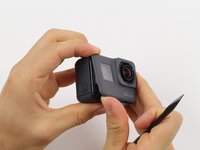
    3. GoPro Hero5 Black Back Housing Replacement: passo 5, immagine 1 di 3 GoPro Hero5 Black Back Housing Replacement: passo 5, immagine 2 di 3 GoPro Hero5 Black Back Housing Replacement: passo 5, immagine 3 di 3
      • Starting with the edges, use the spudger to pry off the faceplate.

      • The faceplate is held down with adhesive and may take a while to get off.

      Chiedi a FixBot

      Aggiungi Commento

    4. GoPro Hero5 Black Back Housing Replacement: passo 6, immagine 1 di 2 GoPro Hero5 Black Back Housing Replacement: passo 6, immagine 2 di 2
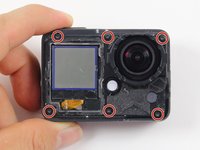
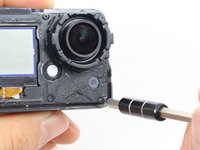
      • Remove the six T3 Torx screws.

      Chiedi a FixBot

      Aggiungi Commento

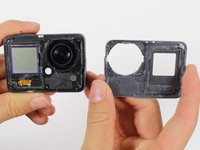
    5. GoPro Hero5 Black Back Housing Replacement: passo 7, immagine 1 di 3 GoPro Hero5 Black Back Housing Replacement: passo 7, immagine 2 di 3 GoPro Hero5 Black Back Housing Replacement: passo 7, immagine 3 di 3
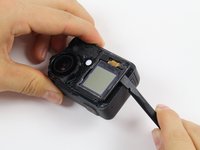
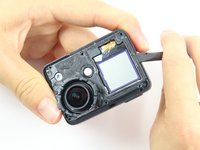
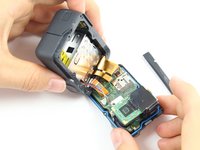
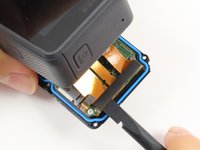
      • Be careful when pulling open the motherboard assembly as it is still connected to the back housing by four cables. The cables may break if stretched.

      • Using the spudger, slowly pry open the motherboard assembly from the LCD side of the GoPro.

      Chiedi a FixBot

      Aggiungi Commento

    6. GoPro Hero5 Black Back Housing Replacement: passo 8, immagine 1 di 3 GoPro Hero5 Black Back Housing Replacement: passo 8, immagine 2 di 3 GoPro Hero5 Black Back Housing Replacement: passo 8, immagine 3 di 3
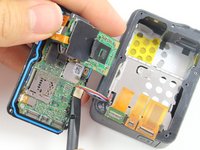
      • Use the flat end of a spudger to pry the three ribbon cables connected to the side of the motherboard.

      Chiedi a FixBot

      Aggiungi Commento

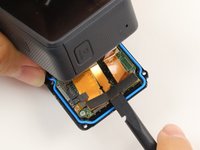
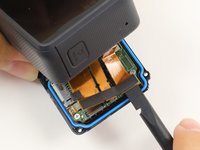
    7. GoPro Hero5 Black Back Housing Replacement: passo 9, immagine 1 di 2 GoPro Hero5 Black Back Housing Replacement: passo 9, immagine 2 di 2
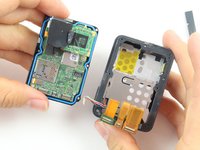
      • Use the flat end of the spudger to pry the battery housing power cable straight up from its socket on the motherboard.

      Chiedi a FixBot

      Aggiungi Commento

Conclusione

To reassemble your device, follow these instructions in reverse order.

Annulla: non ho completato questa guida.

Altre 16 persone hanno completato questa guida.

Team

Cal Poly, Team 18-6, Forte Fall 2016 Membro di Cal Poly, Team 18-6, Forte Fall 2016

CPSU-FORTE-F16S18G6

4 Membri

22 guide realizzate

2Commenti sulla guida

Where can you get replacement rear screens for this

ociaravella - Rispondi Condividi
Hi, how i reset firmware in this gopro? I have a problem with a bucle starting and it dont turn on, always restarting.

ISU AREY - Rispondi Condividi
Aggiungi Commento

Visualizza statistiche:

Ultime 24 ore: 6

Ultimi 7 giorni: 44

Ultimi 30 giorni: 146

Tutti i Tempi: 26,872