Questa traduzione è stata generata automaticamente e non è stata ancora revisionata da una persona. Parli questa lingua? Dai un’occhiata.
Introduzione
La scheda wireless è un componente chiave per l'uso quotidiano del tuo portatile. Questa scheda wireless, nota anche come NIC o Network Interface Card, ha una forma quadrata e si trova nella sezione centrale sul retro del portatile, vicino alla memoria e al disco rigido. Inoltre, prima di tentare la sostituzione, assicurati che il dispositivo sia spento e leggi attentamente questa guida prima di iniziare la riparazione. La sicurezza viene sempre prima di tutto!
Cosa ti serve
-
-
-
Capovolgi il portatile in modo che la parte inferiore sia rivolta verso l'alto.
 Chiedi a FixBot
-
-
-
Usando uno spudger in nylon o le dita, premi verso il basso la clip arancione della batteria per sganciarla.
-
-
-
-
-
-
Successivamente, utilizzando la punta PH1 del kit di strumenti e il cacciavite regolabile, rimuovi le due viti M3x5.0mm sul rivestimento per accedere alla scheda wireless.
-
-
-
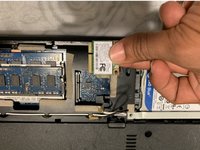
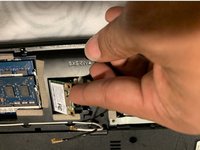
Una volta individuati, scollega i cavi bianco e nero dalla scheda wireless. Si tratta dei cavi dell'antenna principale e ausiliaria.
-
-
-
Usando la punta PH1 dal kit di strumenti e il cacciavite regolabile, rimuovi la vite M3x5,0 mm che mantiene intatta la scheda wireless.
-
-


Per rimontare il dispositivo, segui queste istruzioni in ordine inverso.

Team

UMass Dartmouth, Team S6-G1, Peak Spring 2019 Membro di UMass Dartmouth, Team S6-G1, Peak Spring 2019
UMASSD-PEAK-S19S6G1
2 Membri
28 guide realizzate
