Introduzione
The Fellowes T7CM Paper shredder has a three way switch. This switch has three modes; on, off, or reverse. This guide explains how to remove and replace the switch.
Cosa ti serve
-
-
-
Check to make sure the shredder is not plugged in to any electrical outlet.
-
Remove the shredder from the catch basket and place the silver side down on a flat surface.
-
Place the catch basket aside as you will not be needing it for the rest of the disassembly.
 Chiedi a FixBot
-
-
-
Flip the shredder silver side down and place on a flat even surface.
-
Remove the manufacturer's label in order to gain access to the hidden screw hole.
-
Locate all five of the case screws and remove them with a Phillips-Head screwdriver. The screws are located within the five marked circles in the photo. The size of the screws are 18 mm in length and head diameter of 5 mm.
-
-
-
-
Once all of the screws are removed, slowly pull apart the casing.
-
If the casing is not separating, gently wiggle the top part of the casing from the bottom part of the casing.
-
-
-
Open the casing as shown to prevent tangling or damaging the wires.
-
Take note to how the trigger assembly is attached before removal.
-
The trigger assembly is one part and should come off all together with little to no force applied.
-
Remove the trigger assembly.
-
-
-
-
-
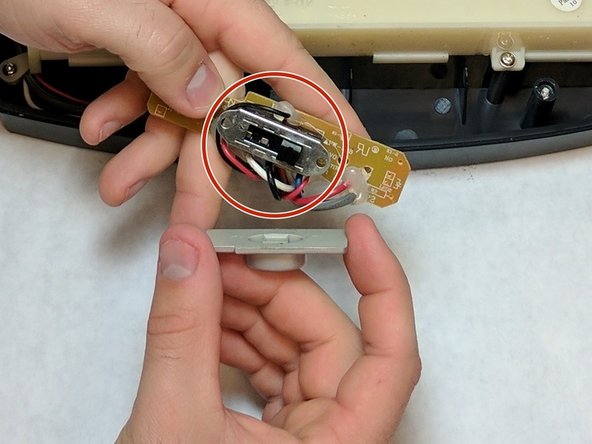
Unscrew both of the screws from the circuit board of the switch . Lift the circuit board away from the device. The screw length is 10 mm and the head diameter is 6 mm.
-
-
-
Remove the plastic switch case.
-
After the plastic case is removed, the switch can be replaced.
-
During the switch replacement, be careful of the springs that are held in side. They can potentially come loose and get lost.
-
-


To reassemble your device, follow these instructions in reverse order.

Team

IUPUI, Team 2-2, Baechle Fall 2016 Membro di IUPUI, Team 2-2, Baechle Fall 2016
IUPUI-BAECHLE-F16S2G2
4 Membri
16 guide realizzate
