Salta al contenuto principale
Unisciti alla Community delle riparazioni - Crea un account

Fast Fix Screen Replacement

Cosa ti serve

  1. Fast Fix Screen Replacement, Screen: passo 1, immagine 1 di 3 Fast Fix Screen Replacement, Screen: passo 1, immagine 2 di 3 Fast Fix Screen Replacement, Screen: passo 1, immagine 3 di 3
    • Slide both battery latches to release cover.

    • Remove battery.

    Chiedi a FixBot
  2. Fast Fix Screen Replacement: passo 2, immagine 1 di 2 Fast Fix Screen Replacement: passo 2, immagine 2 di 2
    • Remove the M2.5 X 5mm phillips screw for the CD drive.

    • Remove the CD drive.

    Chiedi a FixBot
  3. Fast Fix Screen Replacement: passo 3, immagine 1 di 2 Fast Fix Screen Replacement: passo 3, immagine 2 di 2
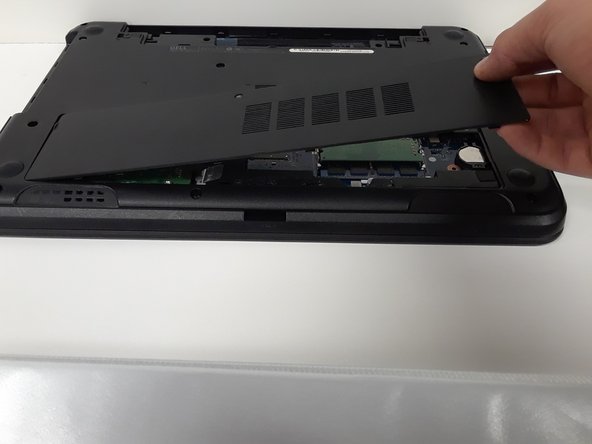
    • Loosen 2 screws on access door.

    • They cannot be removed

    • Remove the access door.

    Chiedi a FixBot
  4. Fast Fix Screen Replacement: passo 4, immagine 1 di 1
    • Remove 12 M2.5 X 5MM Phillips bottom palm rest screws.

    Chiedi a FixBot
  5. Fast Fix Screen Replacement: passo 5, immagine 1 di 3 Fast Fix Screen Replacement: passo 5, immagine 2 di 3 Fast Fix Screen Replacement: passo 5, immagine 3 di 3
    • Use a small screwdriver to press in the keyboard latches.

    • Remove the keyboard.

    • Unplug the keyboard cable at the ZIF connection.

    Chiedi a FixBot
  6. Fast Fix Screen Replacement: passo 6, immagine 1 di 3 Fast Fix Screen Replacement: passo 6, immagine 2 di 3 Fast Fix Screen Replacement: passo 6, immagine 3 di 3
    • Remove the palm-rest cable by releasing the ZIF latch and pulling the wire out.

    • Remove 5 M2.5 X 5mm Phillips and 2 M2 X 3mm Phillips palm-rest screws.

    Chiedi a FixBot
  7. Fast Fix Screen Replacement: passo 7, immagine 1 di 1
    • Use a small flat screwdriver to pry the palm-rest off of the computer.

    Chiedi a FixBot
  8. Fast Fix Screen Replacement: passo 8, immagine 1 di 3 Fast Fix Screen Replacement: passo 8, immagine 2 di 3 Fast Fix Screen Replacement: passo 8, immagine 3 di 3
    • Remove the wireless antenna

    • Remove the LCD cable

    Chiedi a FixBot
  9. Fast Fix Screen Replacement: passo 9, immagine 1 di 1
    • Remove the 1 M2.5 x 5mm Phillips left hinge screw and 2 M2.5 x 5mm Phillips right hinge screw.

    Chiedi a FixBot
  10. Fast Fix Screen Replacement: passo 10, immagine 1 di 1
    • Pry off the LCD bevel using a small flat screwdriver.

    Chiedi a FixBot
  11. Fast Fix Screen Replacement: passo 11, immagine 1 di 1
    • Remove the 4 M2 X 3mm Philips LCD screws.

    Chiedi a FixBot
  12. Fast Fix Screen Replacement: passo 12, immagine 1 di 2 Fast Fix Screen Replacement: passo 12, immagine 2 di 2
    • Unplug the screen cable and remove the screen.

    Chiedi a FixBot
Conclusione

To reassemble your device, follow these instructions in reverse order.

Altre 4 persone hanno completato questa guida.

Carl Kangas

Membro da: 10/01/17

209 Reputazione

Una guida realizzata

Team

Michigan Tech, Team S3-G8, Galliah Fall 2017 Membro di Michigan Tech, Team S3-G8, Galliah Fall 2017

MTU-GALLIAH-F17S3G8

Membro di 1

1 guide realizzate

2Commenti sulla guida

Hello good day, I have a question, I have managed to replace the screen and the computer started the first time without problems, but after I started it again the computer did not turn on the screen again, will you have any possible solution?

vikingo1ero - Rispondi Condividi

Hi, Did you ever fix this problem? I'm having the same issue.

Chris Terry - Rispondi Condividi

Aggiungi Commento

Visualizza statistiche:

Ultime 24 ore: 1

Ultimi 7 giorni: 11

Ultimi 30 giorni: 97

Tutti i Tempi: 3,545