Cosa ti serve
-
-
-
Prior to starting, make sure vacuum is unplugged.
-
Set down the vacuum so that the clear debris bin is at the base of the vacuum and the silver cyclone is at the top.
 Chiedi a FixBot
-
-
-
-
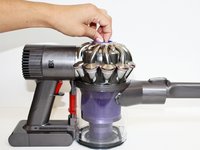
Locate the blue knob in the center of the silver cyclone labeled “Filter.”
-
-
-
Twist the blue knob clockwise.
-
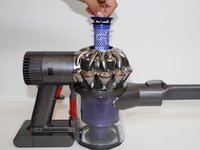
Gently lift the filter up and out of the center of the vacuum cyclone (the silver part at the top of the vacuum).
-
-


To reassemble your device, follow these instructions in reverse order.
Annulla: non ho completato questa guida.
Altre 5 persone hanno completato questa guida.

Team

CSU Fullerton, Team 2-4, Bruce Fall 2015 Membro di CSU Fullerton, Team 2-4, Bruce Fall 2015
CSUF-BRUCE-F15S2G4
4 Membri
24 guide realizzate
