Salta al contenuto principale
Unisciti alla Community delle riparazioni - Crea un account

Dell XPS 13 9300 SSD Replacement

Cosa ti serve

  1. Dell XPS 13 9300 SSD Replacement, Unfasten the lower case: passo 1, immagine 1 di 2 Dell XPS 13 9300 SSD Replacement, Unfasten the lower case: passo 1, immagine 2 di 2
    • Use a T5 Torx screwdriver to remove the eight 3.3 mm screws securing the case.

    Chiedi a FixBot

    Aggiungi Commento

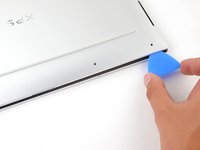
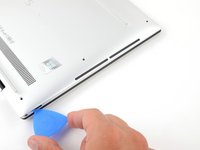
  2. Dell XPS 13 9300 SSD Replacement, Insert an opening pick: passo 2, immagine 1 di 2 Dell XPS 13 9300 SSD Replacement, Insert an opening pick: passo 2, immagine 2 di 2
    • Insert an opening pick between the lower case and the chassis on the front right edge.

    Chiedi a FixBot

    Aggiungi Commento

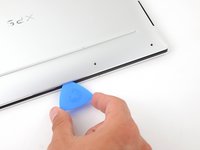
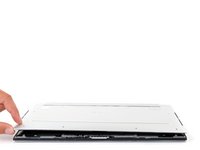
  3. Dell XPS 13 9300 SSD Replacement, Release the case's front clips: passo 3, immagine 1 di 2 Dell XPS 13 9300 SSD Replacement, Release the case's front clips: passo 3, immagine 2 di 2
    • Slide the pick along the front edge to release the clips securing the lower case.

    Chiedi a FixBot

    Aggiungi Commento

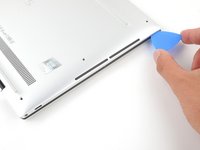
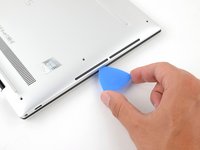
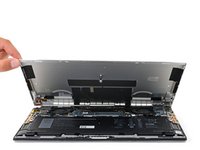
  4. Dell XPS 13 9300 SSD Replacement, Release the remaining clips: passo 4, immagine 1 di 3 Dell XPS 13 9300 SSD Replacement, Release the remaining clips: passo 4, immagine 2 di 3 Dell XPS 13 9300 SSD Replacement, Release the remaining clips: passo 4, immagine 3 di 3
    • Continue sliding the opening pick along the perimeter of the lower case to release the remaining clips.

    Chiedi a FixBot

    Aggiungi Commento

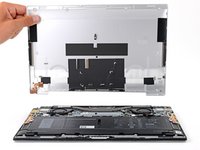
  5. Dell XPS 13 9300 SSD Replacement: passo 5, immagine 1 di 3 Dell XPS 13 9300 SSD Replacement: passo 5, immagine 2 di 3 Dell XPS 13 9300 SSD Replacement: passo 5, immagine 3 di 3
    • Lift the lower case from the chassis and remove it.

    • During reassembly, this is a good point to power on your laptop and test all functions before sealing it up. Be sure to power your laptop back down before you continue working.

    Chiedi a FixBot

    Aggiungi Commento

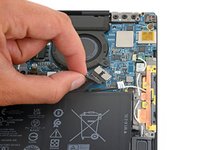
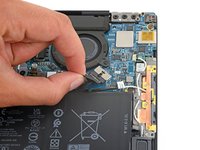
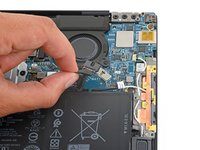
  6. Dell XPS 13 9300 SSD Replacement, Disconnect the battery: passo 6, immagine 1 di 3 Dell XPS 13 9300 SSD Replacement, Disconnect the battery: passo 6, immagine 2 di 3 Dell XPS 13 9300 SSD Replacement, Disconnect the battery: passo 6, immagine 3 di 3
    • Grip the pull tab on the battery connector with your fingers and gently pull away from the socket to disconnect it.

    • After you disconnect the battery, some of your laptop's startup (BIOS) settings will revert to their defaults.

    • You may need to run BIOS setup to reset the system clock as well as any specialized disk settings before you can boot up your XPS.

    Chiedi a FixBot

    Aggiungi Commento

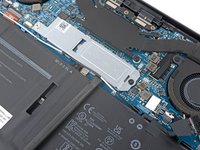
  7. Dell XPS 13 9300 SSD Replacement, Loosen the antenna wire: passo 7, immagine 1 di 3 Dell XPS 13 9300 SSD Replacement, Loosen the antenna wire: passo 7, immagine 2 di 3 Dell XPS 13 9300 SSD Replacement, Loosen the antenna wire: passo 7, immagine 3 di 3
    • Use the flat end of a spudger to pry up and loosen the antenna wire from the SSD cover.

    • Repeat this process along the entire edge of the SSD cover.

    Chiedi a FixBot

    Aggiungi Commento

  8. Dell XPS 13 9300 SSD Replacement, Unfasten the SSD cover: passo 8, immagine 1 di 2 Dell XPS 13 9300 SSD Replacement, Unfasten the SSD cover: passo 8, immagine 2 di 2
    • Use a Phillips screwdriver to remove the 3.6 mm screw securing the SSD cover

    Chiedi a FixBot

    Aggiungi Commento

  9. Dell XPS 13 9300 SSD Replacement, Remove the SSD cover: passo 9, immagine 1 di 3 Dell XPS 13 9300 SSD Replacement, Remove the SSD cover: passo 9, immagine 2 di 3 Dell XPS 13 9300 SSD Replacement, Remove the SSD cover: passo 9, immagine 3 di 3
    • Pull the SSD cover away from its fastener to remove it.

    Chiedi a FixBot

    Aggiungi Commento

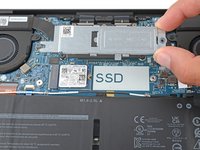
  10. Dell XPS 13 9300 SSD Replacement, Remove the SSD: passo 10, immagine 1 di 3 Dell XPS 13 9300 SSD Replacement, Remove the SSD: passo 10, immagine 2 di 3 Dell XPS 13 9300 SSD Replacement, Remove the SSD: passo 10, immagine 3 di 3
    • Pull the SSD out of its socket and remove it. Keep the SSD as parallel to the motherboard as possible when pulling on it.

    • Do not pull up at a sharp angle, as this could damage the SSD and the socket.

    Chiedi a FixBot

    Aggiungi Commento

  11. Dell XPS 13 9300 SSD Replacement, Reassembly notes: passo 11, immagine 1 di 1
    Chiedi a FixBot

    Aggiungi Commento

Conclusione

To reassemble your device, follow these instructions in reverse order.

Take your e-waste to an R2 or e-stewards certified recycler.

Repair didn't go as planned? Try some basic troubleshooting, or ask our Dell XPS answers community for help.

Annulla: non ho completato questa guida.

Spencer Day

Membro da: 09/14/22

190.892 Reputazione

1.204 guide realizzate

Team

iFixit Membro di iFixit

Staff

122 Membri

25.930 guide realizzate

0Commenti sulla guida

Aggiungi Commento

Visualizza statistiche:

Ultime 24 ore: 3

Ultimi 7 giorni: 12

Ultimi 30 giorni: 51

Tutti i Tempi: 2,755