Salta al contenuto principale
Unisciti alla Community delle riparazioni - Crea un account

Dell Optiplex 745 Small Form Factor Fan Replacement

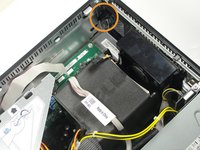
  1. Dell Optiplex 745 Small Form Factor Fan Replacement, Opening the case: passo 1, immagine 1 di 2 Dell Optiplex 745 Small Form Factor Fan Replacement, Opening the case: passo 1, immagine 2 di 2
    • Pull the tab and the lid will pop up.

    Chiedi a FixBot
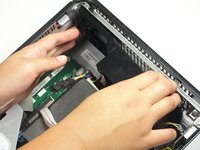
  2. Dell Optiplex 745 Small Form Factor Fan Replacement: passo 2, immagine 1 di 2 Dell Optiplex 745 Small Form Factor Fan Replacement: passo 2, immagine 2 di 2
    • Grab the lid and pull it up and off.

    Chiedi a FixBot
  3. Dell Optiplex 745 Small Form Factor Fan Replacement, Fan: passo 3, immagine 1 di 3 Dell Optiplex 745 Small Form Factor Fan Replacement, Fan: passo 3, immagine 2 di 3 Dell Optiplex 745 Small Form Factor Fan Replacement, Fan: passo 3, immagine 3 di 3
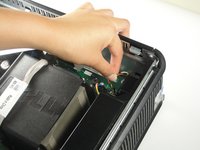
    • Disconnect the cable bundle from the motherboard.

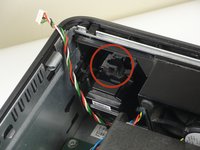
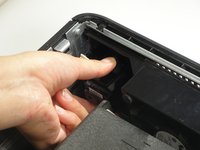
    • Press the tab down, and pull the component toward yourself.

    Chiedi a FixBot
  4. Dell Optiplex 745 Small Form Factor Fan Replacement: passo 4, immagine 1 di 3 Dell Optiplex 745 Small Form Factor Fan Replacement: passo 4, immagine 2 di 3 Dell Optiplex 745 Small Form Factor Fan Replacement: passo 4, immagine 3 di 3
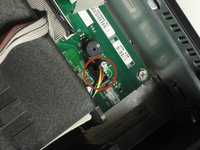
    • Pull the cable bundle out of the motherboard.

    • Push the black tab away from the computer case and pull the fan away from the case.

    Chiedi a FixBot
Conclusione

To reassemble your device, follow these instructions in reverse order.

Altre 7 persone hanno completato questa guida.

Team

Cal Poly, Team 13-10, Forte Fall 2014 Membro di Cal Poly, Team 13-10, Forte Fall 2014

CPSU-FORTE-F14S13G10

6 Membri

12 guide realizzate

0Commenti sulla guida

Aggiungi Commento

Visualizza Statistiche:

Ultime 24 Ore: 0

Ultimi 7 Giorni: 8

Ultimi 30 Giorni: 47

Tutti i Tempi: 4,779