Salta al contenuto principale
Unisciti alla Community delle riparazioni - Crea un account

Dell Inspiron 9300 RAM Replacement

Cosa ti serve

  1. Dell Inspiron 9300 RAM Replacement, RAM: passo 1, immagine 1 di 2 Dell Inspiron 9300 RAM Replacement, RAM: passo 1, immagine 2 di 2
    Attrezzo utilizzato in questo passaggio:
    Anti-Static Wrist Strap
    $7.95
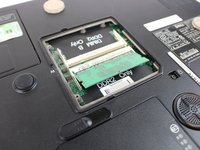
    • Flip the computer over and place it on a clean level surface.

    • Loosen the screws using a #0 Phillips screw driver.

    • It is strongly recommended that the Anti-Static Wrist Strap is used to avoid damage to internal components.

    • The screws are secured by retainer clips in the plastic panel and are not fully removable.

  2. Dell Inspiron 9300 RAM Replacement: passo 2, immagine 1 di 1
    • Remove the plastic panel.

  3. Dell Inspiron 9300 RAM Replacement: passo 3, immagine 1 di 2 Dell Inspiron 9300 RAM Replacement: passo 3, immagine 2 di 2
    Attrezzo utilizzato in questo passaggio:
    Heavy-Duty Spudger
    $4.99
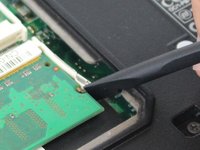
    • Carefully pry away the retaining clips on either side of the ram modules using a spudger tool, until the card pops away from the motherboard.

    • Repeat for the second ram module if necessary.

  4. Dell Inspiron 9300 RAM Replacement: passo 4, immagine 1 di 1
    • Carefully pull the ram modules out of it's slot, away from the motherboard.

Conclusione

To reassemble your device, follow these instructions in reverse order.

Un'altra persona ha completato questa guida.

Team

Master Techs Membro di Master Techs

Community

333 Membri

1.479 Guide realizzate

0Commenti sulla guida

Aggiungi Commento

Visualizza Statistiche:

Ultime 24 Ore: 0

Ultimi 7 Giorni: 0

Ultimi 30 Giorni: 9

Tutti i Tempi: 525