Questa traduzione è stata generata automaticamente e non è stata ancora revisionata da una persona. Parli questa lingua? Dai un’occhiata.
Introduzione
Questa guida mostra come sostituire una batteria difettosa. Gli strumenti necessari sono: un cacciavite a croce Phillips da 1 mm e uno strumento a punta piatta e smussata (può andar bene anche una tessera di plastica). Tieni presente che, poiché il Creative Zen Vision M è uscito nel 2005 ed è ormai fuori produzione, potresti avere difficoltà ad acquistare una batteria sostitutiva.
Cosa ti serve
-
-
-
Fai saltare la plastica superiore del dispositivo con uno strumento piatto, come un cacciavite a taglio.
-
Svita e rimuovi le due viti a croce Phillips esposte.
 Chiedi a FixBot
-
-
-
Fatti strada lungo l'incavo del dispositivo con uno strumento piatto come un cacciavite a taglio.
-
Non tentare di aprirlo dall'incavo tra i pulsanti e il dispositivo.
-
-
-
-
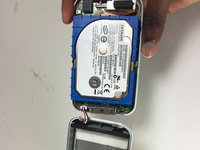
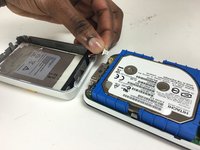
Per scollegare il cablaggio dallo schermo, tira delicatamente i cavi collegati alla batteria. Si trovano nella metà inferiore dello schermo.
-
-
-
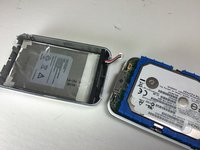
Per iniziare la rimozione della batteria, sposta il cablaggio da sotto la schiuma nera nella parte inferiore del dispositivo
-
-
-
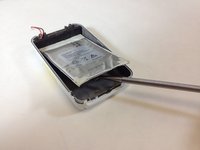
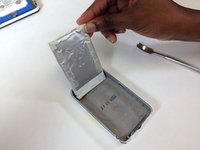
Usa uno strumento di apertura in plastica o uno spudger in nylon per sollevare la batteria.
-
-




Per rimontare il dispositivo, segui queste istruzioni in ordine inverso.
Annulla: non ho completato questa guida.
Altre 7 persone hanno completato questa guida.

Team

Texas Tech, Team 12-1, Bennett Fall 2016 Membro di Texas Tech, Team 12-1, Bennett Fall 2016
TTU-BENNETT-F16S12G1
4 Membri
48 guide realizzate
4Commenti sulla guida
Step 1 does not mention that the bottom cover needs to also be removed to access two more screws. Make note of the screw lengths and where they come from.. Two are shorter.
Seconding this, if you try to separate the top and bottom covers before unscrewing the two screws to the sides of the charging/data port you may damage your device irreparably. In my case I had already watched a guide online and I did not damage mine, but after so many years the plastic has degraded and it's very easy to see how you could do some serious damage if you're not careful.
Does anyone know, what do you do if the existing battery goes completely flat, and the unit will not charge. I believe the battery needs replacing. Are these batteries available, and if they do, what is the shelf life of a new battery?
Note that last Vision:M firmware's versions are not compatible with most third-party batteries, especially those with a capacity different than 1400mAh. The symptoms are a battery that is always recognized to be empty and that doesn't charge at all. If it is you case, you need to downgrade to firmware 1.41.01 (or remplace the battery controller board ...). See eg https://www.reddit.com/r/DHExchange/comm...
