Questa traduzione è stata generata automaticamente e non è stata ancora revisionata da una persona. Parli questa lingua? Dai un’occhiata.
Introduzione
Se la fotocamera visualizza un messaggio che indica che la memoria è "bloccata", questa guida ti mostrerà come correggere il problema. Per prima cosa ti verrà mostrato dove si trova la scheda di memoria e come rimuoverla. Se sai già come farlo, puoi passare direttamente al passaggio 3 per sbloccare la scheda di memoria.
-
-
-
Orienta la fotocamera con l'obiettivo rivolto verso destra e la parte inferiore della fotocamera verso di te.
-
Afferrando saldamente la fotocamera, premi con decisione verso il basso sulla parte con l'etichetta e falla scorrere verso lo schermo LCD (verso sinistra).
-
Lo sportello si solleverà quindi verso l'alto.
 Chiedi a FixBot
-
-
-
-
Spingi verso il basso la scheda di memoria (situata dietro la batteria) e poi rilascia completamente la pressione.
-
Afferra la scheda di memoria su entrambi i lati e sfilala semplicemente dal suo alloggiamento per rimuoverla.
-
-
-
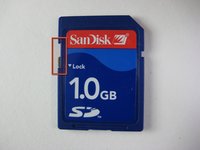
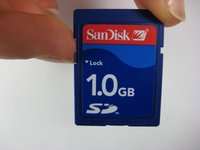
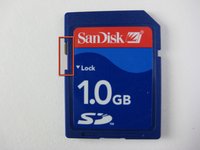
Se la tua scheda di memoria è bloccata, sul lato sinistro è presente un cursore con blocco che può essere spostato verso l'alto per sbloccare la scheda.
-
-


Per rimontare il dispositivo, segui queste istruzioni in ordine inverso.
Annulla: non ho completato questa guida.
Altre 2 persone hanno completato questa guida.

Team

Cal Poly, Team 17-28, Amido Spring 2012 Membro di Cal Poly, Team 17-28, Amido Spring 2012
CPSU-AMIDO-S12S17G28
4 Membri
84 guide realizzate
3Commenti sulla guida
My Casio camera works great until I insert the memory card. When it doesn't have the memory card, it turns on, the lenses come out and everything but as soon as I insert the memory card, the lenses will come out have way, and then the camera shuts off like that. The only way to get the lenses to get inside and the camera to turn on, is to remove the memory card. HELP ME PLEASE!
I have a similar issue. My camera won’t recognize the SD card! It’ll turn on & take pic’s in the Memory area, but them it’s FULL after a few. Isn’t there something that can be done?
I see NO ONE HAS ANSWERED THE LAST PERSONS QUESTION….????????????
