Salta al contenuto principale
Unisciti alla Community delle riparazioni - Crea un account

Canon EOS 30 LCD Screen Replacement

Cosa ti serve

  1. Canon EOS 30 LCD Screen Replacement, Front Panel: passo 1, immagine 1 di 1
    • Remove the two 4.8 mm black screws above the lens on the front of the camera.

    Chiedi a FixBot
  2. Canon EOS 30 LCD Screen Replacement: passo 2, immagine 1 di 1
    • Remove the 4.3 mm black screw under the lens ring, and the 4.8 mm black screw under the camera.

    Chiedi a FixBot
  3. Canon EOS 30 LCD Screen Replacement: passo 3, immagine 1 di 1
    • Remove the 4.8 mm black screw on the left side of the camera.

    Chiedi a FixBot
  4. Canon EOS 30 LCD Screen Replacement: passo 4, immagine 1 di 1
    • Remove the front panel by lifting it away from the camera's body.

    Chiedi a FixBot
  5. Canon EOS 30 LCD Screen Replacement, Top Panel: passo 5, immagine 1 di 1
    • Slide the outer eyepiece upward to remove it.

    Chiedi a FixBot
  6. Canon EOS 30 LCD Screen Replacement: passo 6, immagine 1 di 1
    • Remove the two 4.75 mm black screws located on the top of the camera.

    Chiedi a FixBot
  7. Canon EOS 30 LCD Screen Replacement: passo 7, immagine 1 di 1
    • Remove the four 4.3 mm black screws near the bottom corners of the eyepiece at the back of the camera.

    Chiedi a FixBot
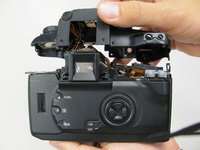
  8. Canon EOS 30 LCD Screen Replacement: passo 8, immagine 1 di 2 Canon EOS 30 LCD Screen Replacement: passo 8, immagine 2 di 2
    • Slowly separate the top panel from the camera by pushing it upward.

    • Separating the top panel too far or quickly can damage the ribbon cable and connecting wires that are still attached to the top panel of the camera.

    Chiedi a FixBot
  9. Canon EOS 30 LCD Screen Replacement, LCD Screen: passo 9, immagine 1 di 1
    • To unclip gold connector push the edge up and away from the lcd screen. A plastic opening tool is recommended.

    • The gold connector can fall into the camera, but it will remain attached and can be pulled back up.

    Chiedi a FixBot
  10. Canon EOS 30 LCD Screen Replacement: passo 10, immagine 1 di 1
    • Lift LCD screen out of mount.

    Chiedi a FixBot
Conclusione

To reassemble your device, follow these instructions in reverse order.

Altre 4 persone hanno completato questa guida.

Team

Cal Poly, Team 8-8, Regan Spring 2011 Membro di Cal Poly, Team 8-8, Regan Spring 2011

CPSU-REGAN-S11S8G8

5 Membri

22 guide realizzate

2Commenti sulla guida

Thank's , your tutorial nice ... gracias

fajar - Rispondi Condividi

Where do you find replacement lcd screen if the one on the camera is cracked?

Jasmine - Rispondi Condividi

Aggiungi Commento

Visualizza statistiche:

Ultime 24 ore: 0

Ultimi 7 giorni: 13

Ultimi 30 giorni: 100

Tutti i Tempi: 5,983